
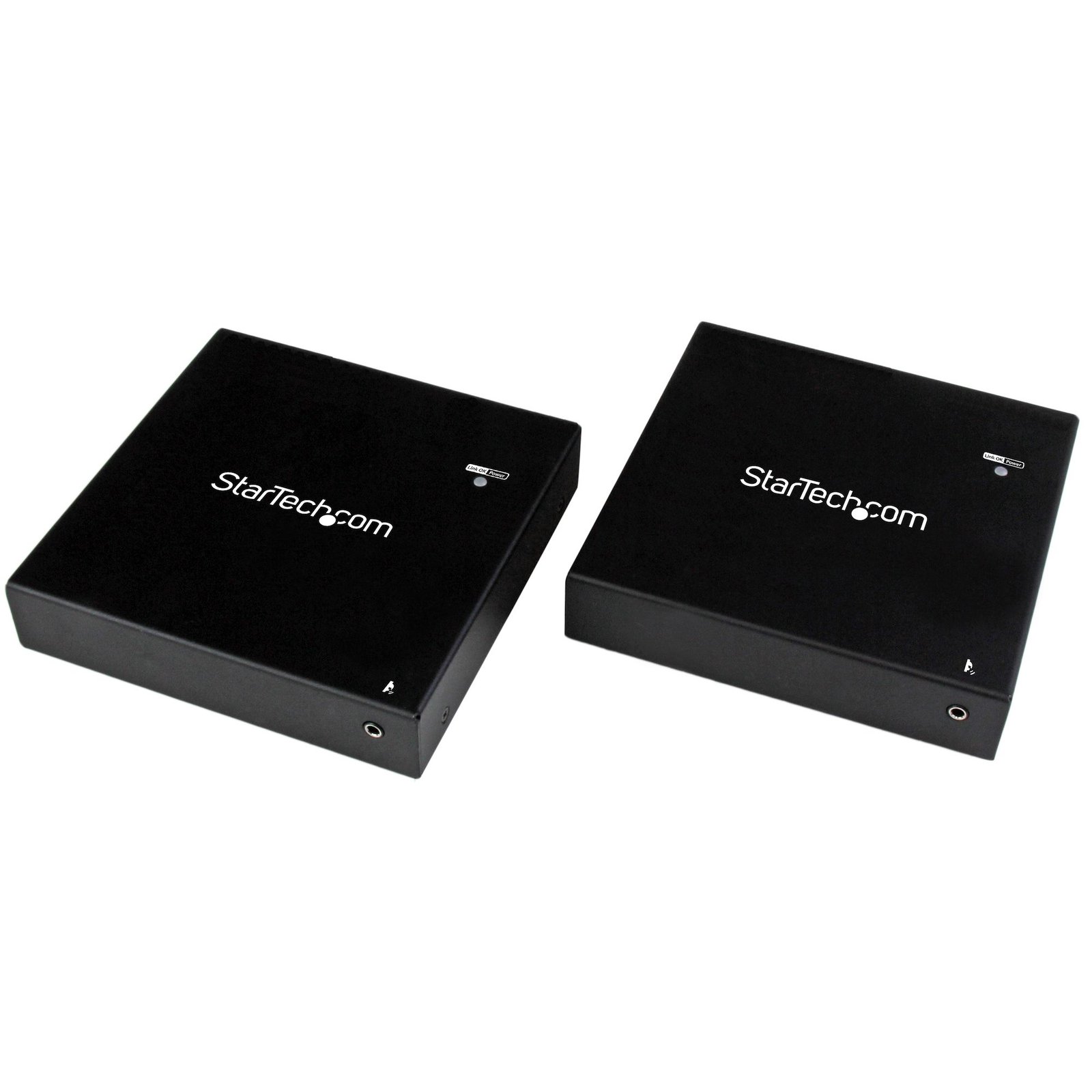
HDMI over Fiber KVM Console Extender - USB or PS2 - 1KM
$900.99
Operate the keyboard and mouse while viewing the HDMI display of a PC or KVM switch, from up to 1km (3280ft) away over fiber optic cabling
Specifications & Compliance
- UPC
- 065030859769
- Brand
- StarTech.com
- Included in Package
- 1 - local extender unit, 1 - remote extender Unit, 1 - PS/2 y-cable, 1 - external IR sensor Kit, 1 - 2m (6.56ft) SC-SC fiber optic cable, 2 - universal power adapters (NA, EU, UK, ANZ)
- Shipping (Package) Weight
- 4.6 lb [2.1 kg]
- Weight of Product
- 19.8 oz [560.0 g]
- Product Length
- 5.2 in [13.2 cm]
- Product Width
- 5.1 in [13.0 cm]
- Product Height
- 1.1 in [28.0 mm]
- Package Depth
- 9.2 in [23.3 cm]
- Package Width
- 14.6 in [37.1 cm]
- Package Height
- 3.0 in [76 mm]
- Warranty
- 2 Years
- Connector 1
- HDMI
- Connector 1 (Quantity)
- 1
- Package Quantity
- 1
- Connector 2
- SC Duplex Fiber
- Connector 2 (Quantity)
- 1
- Operating Temperature
- 0°C to 40°C (32°F to 104°F)
- Storage Temperature
- -20°C to 60°C (-4°F to 140°F)
- Humidity
- 0~80% RH
- Power Source
- 2 AC Adapters Included
- Input Voltage
- 100 - 240 AC
- Output Voltage
- 12V DC
- Connector 3
- USB-A (480Mbps, 2.5W)
- Connector 3 (Quantity)
- 2
- Power Consumption
- 15W
- MTBF
- 190000 hours
- LED Indicators
- 2 - Reset LED (extender & receiver)
- Input Current
- 0.6
- Output Current
- 1.25
- Maximum Digital Resolutions
- 1920 x 1200 (1920 x 1080 widescreen - 1080p)
- Host Connector 1
- HDMI
- Host Connector 1 (Quantity)
- 1
- Audio
- Yes
- Plug Type
- M
- Center Tip Polarity
- Positive
- Connector 4
- Infrared (IrDA)
- Connector 4 (Quantity)
- 1
- Wide Screen Supported
- Yes
- Max Transfer Distance
- 1 km (0.6 mi)
- Host Connector 2
- SC Duplex Fiber
- Host Connector 2 (Quantity)
- 1
- Cascadable
- No
- Rack-Mountable
- Yes
- Number of KVM Ports
- 2
- IP Control
- No
- Supported Platforms
- USB and PS/2
- PC Video Type
- HDMI
- Number of Monitors Supported
- 1
- Cables Included
- No
- Host Connector 3
- USB-B (480Mbps, 2.5W)
- Host Connector 3 (Quantity)
- 1
- Host Connector 4
- PS/2
- Host Connector 4 (Quantity)
- 1
- Host Connector 5
- Infrared (IrDA)
- Host Connector 5 (Quantity)
- 1
Questions & Answers
How do I choose a compatible fiber cable for this device?
The fiber cable must match the device’s mode, wavelength, connector type, and performance requirements. Explanation: Fiber cable compatibility depends on matching the specifications required by the connected fiber devices: Mode compatibility: The cable must match the supported fiber mode (single-mode or multi-mode). Wavelength compatibility: The cable must support the same operating wavelength (for example, 850 nm, 1310 nm, or 1550 nm). Wavelength cannot be changed by the cable. Connector compatibility: The cable connectors (such as LC, SC, ST, or MT) must match the device ports. Simplex vs. duplex: Simplex cables use separate transmit (TX) and receive (RX) connectors, while duplex cables combine them. The cable type must match the device port configuration. Cable classification and performance: For multi-mode fiber, OM classification (OM1–OM5) affects supported distance and bandwidth. The cable must meet the performance requirements of the application, not just the mode. When connecting fiber devices, both ends of the link must use compatible fiber standards, including matching mode, wavelength, and performance characteristics, to ensure reliable communication.
How can I connect this HDMI output to a VGA, DVI, or DisplayPort display?
An HDMI output can be connected to VGA, DVI, or DisplayPort displays using the appropriate adapter or video converter. The required solution depends on the input type of the display and whether HDCP-protected content is being used. Explanation: This device outputs HDMI video signals. If the display or video destination uses a different connection type, an adapter or active video converter may be required. Common conversion options include: VGA: An active HDMI to VGA converter is required because HDMI uses digital video signaling and VGA uses analog video signaling. DVI: A passive HDMI to DVI adapter or cable can be used because HDMI and DVI share compatible digital video signaling. DisplayPort: An active HDMI to DisplayPort converter is required because HDMI and DisplayPort use different signaling technologies. HDCP Considerations Before converting an HDMI signal, determine whether the source content is protected by High-bandwidth Digital Content Protection (HDCP). HDCP is commonly used by devices such as: Blu-ray players DVD players Streaming devices Gaming consoles If the HDMI source is transmitting HDCP-protected content, conversion to an analog video format such as VGA may not be supported because VGA does not support HDCP. In these situations, video may not display correctly or may not display at all. Best Practices For the most reliable results: Use the fewest possible adapters and converters. Verify the required resolution and refresh rate. Confirm that the converter supports the desired signal direction and video format. Consider HDCP requirements when converting protected content.
How can I connect a VGA, DVI, or DisplayPort video source to this device's HDMI input?
This device features an HDMI input. If your video source uses VGA, DVI, or DisplayPort, you can connect it using the appropriate adapter or video converter. The required solution depends on the video output available on the source device. Explanation: HDMI inputs require an HDMI signal. Video sources that use VGA, DVI, or DisplayPort may require signal conversion before they can be connected to this device. Common conversion options include: VGA source: Use an active VGA-to-HDMI converter because VGA uses analog video signaling and HDMI uses digital video signaling. DVI source: Use a passive DVI-to-HDMI adapter, cable, or converter. DVI and HDMI use compatible digital video signaling, making conversion straightforward in most applications. DisplayPort source: Use either a passive or active DisplayPort-to-HDMI adapter, depending on the capabilities of the DisplayPort source. DisplayPort Passive vs. Active Adapters When converting from DisplayPort to HDMI, the correct adapter type depends on whether the DisplayPort source supports DisplayPort Dual-Mode (DP++). Passive adapters require a DisplayPort Dual-Mode (DP++) source. Active adapters work with both standard DisplayPort and DisplayPort Dual-Mode (DP++) sources. If you are unsure whether the source supports DisplayPort Dual-Mode, consult the device documentation or use an active adapter for broader compatibility. For more information about converting DisplayPort video signals, refer to the following FAQ: https://www.startech.com/faq/DisplayPort_Converter_DP_Multi_Mode . For the most reliable installation: Use the fewest possible adapters and converters. Verify support for the required resolution and refresh rate. Confirm that the adapter or converter supports the correct signal direction.
What DC barrel connector power plug types do StarTech.com products use, and what are their dimensions?
StarTech.com DC barrel connector plug types are defined in the “Plug Type” field of the technical specifications, using a letter code that specifies the connector’s outer diameter (OD) and inner diameter (ID) in millimeters for power adapter compatibility. Explanation: In StarTech.com technical specifications, the “Plug Type” field is a standardized identifier for the exact DC barrel connector size required to power a product. Each plug type is assigned a letter code that corresponds to a specific combination of outer diameter (OD) and inner diameter (ID), measured in millimeters. Common DC barrel plug type dimensions Plug Type OD ID A 2.35 mm 0.7 mm B 4.0 mm 1.7 mm C 4.75 mm 1.7 mm H 3.4 mm 1.3 mm L 5.0 mm 2.5 mm M 5.5 mm 2.1 mm N 5.5 mm 2.5 mm The DC barrel connector plug type must match both the outer diameter and inner diameter exactly. A mismatch between the StarTech.com product requirement and the power adapter connector can prevent proper fit or stable power delivery, which may result in device startup failure or intermittent operation. The plug type defines only the physical connector size. The plug type does not define electrical power requirements such as voltage, current, or polarity. The power adapter used with a StarTech.com product must match the product’s specified electrical requirements. Using an incompatible power adapter can cause device malfunction or permanent damage. This standardized DC barrel connector plug type system enables IT professionals and procurement teams to verify connector dimensions, ensure power adapter compatibility, standardize hardware deployments, and identify the correct replacement power supply for StarTech.com products.
Related products
-
USB VGA KVM Console Extender over CAT5 UTP (500 ft) - TAA
$263.41 Add to cart -

HDMI KVM Receiver Over IP Network for the IH2006 Product Series, 4K 60Hz, Driverless, AVoIP, Includes Mounting Kit, Receiver Only
$230.61 Add to cart -
HDMI KVM Extender Over IP Network, 4K 60Hz, Driverless, HDMI and USB Over Ethernet/CAT6, AVoIP, Transmitter and Receiver Kit, Includes Mounting Kits
$400.76 Add to cart -
HDMI KVM Extender over IP Network - 4K 30Hz HDMI 2.0 and USB over IP LAN or Cat5e/Cat6 Ethernet Cable (100m/330ft) - Remote KVM Switch/Console Transmitter/Receiver Extender Kit - TAA
$698.01 Add to cart