
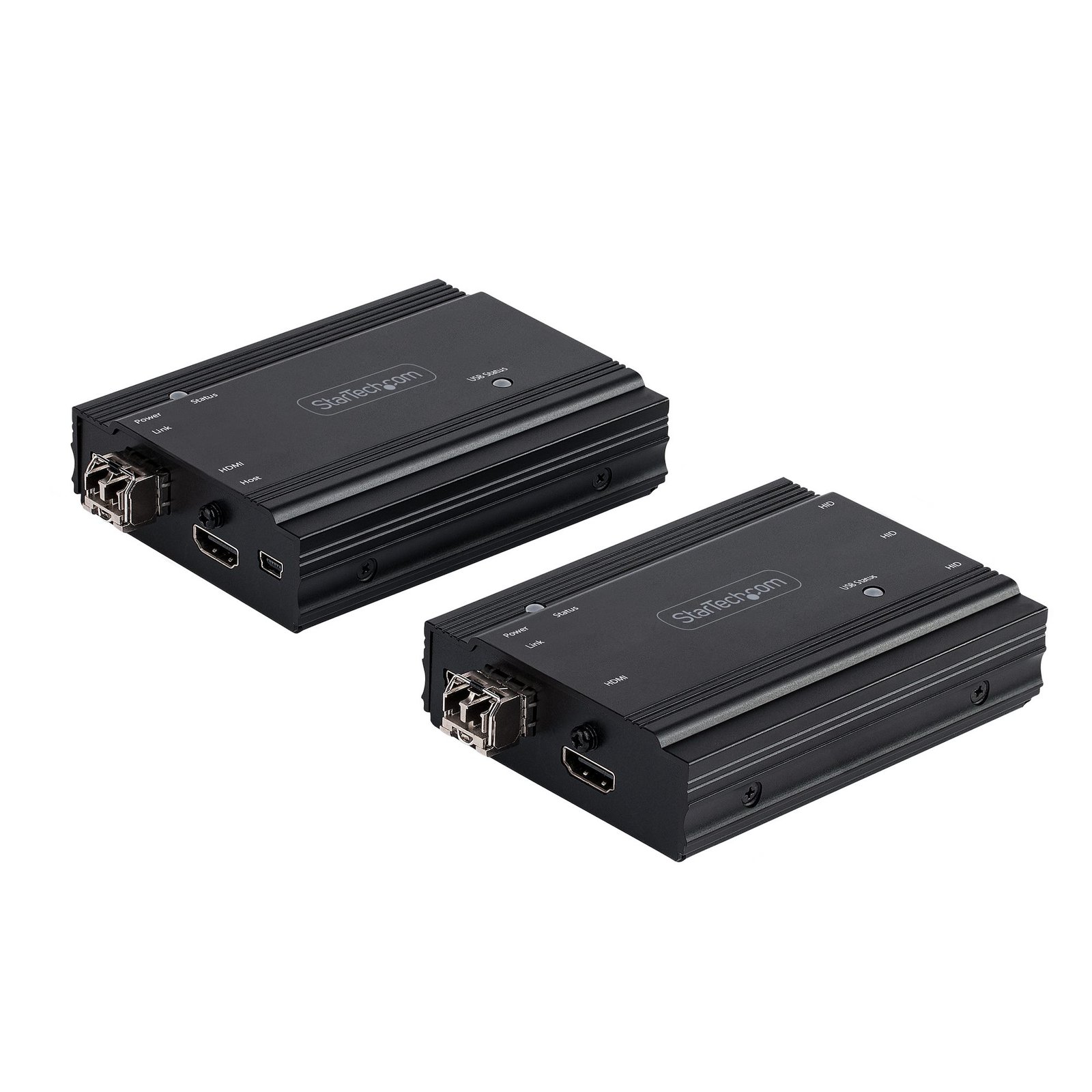
4K HDMI KVM Extender over Fiber - HDMI Video & USB Remote KVM Switch/Console Extender - up to 984ft/300m (MultiMode) - 2x 10G MMF SFP+ modules - KVM Extension Kit (TX/RX) - TAA
$708.26
HDMI KVM Extender Kit | 4K 60Hz | 4:4:4 Chroma Sampling | 2x LC SFP+ (MM) Included
Specifications & Compliance
- UPC
- 065030887694
- Brand
- StarTech.com
- Included in Package
- 1 - Transmitter for Host Computer, 1 - Receiver for Remote Console, 2 - 10G Multimode 10G SFP+ Module (Pre-Installed), 2 - Universal Power Adapter, 3 - USB-A to Mini USB-B Cables, 1 - Quick-Start Guide
- Shipping (Package) Weight
- 2.3 lb [1.0 kg]
- Weight of Product
- 17.3 oz [490.0 g]
- Product Length
- 3.9 in [100.0 mm]
- Product Width
- 3.0 in [75.0 mm]
- Product Height
- 1.1 in [28.0 mm]
- Package Depth
- 7.1 in [18 cm]
- Package Width
- 12.2 in [31 cm]
- Package Height
- 2.9 in [74 mm]
- Color
- Black
- Warranty
- 2 Years
- Connector 1
- SFP+ Slot
- Connector 1 (Quantity)
- 1
- Package Quantity
- 1
- Connector 2
- USB-A (1.5Mbps, 2.5W)
- Connector 2 (Quantity)
- 3
- Operating Temperature
- 0°C to 50°C
- Storage Temperature
- -10°C to 60°C
- Humidity
- 0 - 80 RH, Non-Condensing
- Material
- Metal
- Industry Standards
- IEEE 802.3ae 10GBASE-SR
- Power Source
- AC Adapter Included
- Input Voltage
- 100 - 240 AC
- Output Voltage
- 5 DC
- Connector 3
- HDMI
- Connector 3 (Quantity)
- 1
- Power Consumption
- 10W
- MTBF
- 1,000,000 Hours
- LED Indicators
- 2 - Power/Connection LED, 2 - USB Status LED
- Input Current
- 0.3A
- Output Current
- 2
- Host Connector 1
- HDMI
- Host Connector 1 (Quantity)
- 1
- Audio
- Yes
- Compatible Networks
- 10 Gbps
- Fiber Type
- Multi Mode
- Wide Screen Supported
- Yes
- Supported Resolutions
- 4K @ 60Hz 4:4:4<br> 4K @ 30Hz 4:4:4<br> 1080p
- Wavelength
- 850nm
- Audio Specifications
- HDMI - 7.1 Channel Audio
- Max Transfer Distance
- 300m [984ft]
- Fiber Operating Mode
- Full-Duplex
- Host Connector 2
- SFP+ Slot
- Host Connector 2 (Quantity)
- 1
- Digitial Diagnostics Monitoring Support
- Yes
- Rack-Mountable
- No
- Number of KVM Ports
- 1
- Supported Platforms
- USB
- PC Video Type
- HDMI
- Number of Monitors Supported
- 1
- Video Revision
- HDMI 2.0
- On-Screen Display
- No
- Cables Included
- No
- Hot-Key Selection
- No
Questions & Answers
My Monitors are flickering when connected through the KVM Switch. What do I do?
Monitors may begin flickering when they receive a signal of insufficient quality. There are a few potential fixes available that will help to improve the signal quality in order to eliminate flickering: Replace Video Cables with high-quality Video Cables (e.g. upgrade DisplayPort 1.2 Cables to DisplayPort 1.4 Cables ). Use shorter Video Cables to reduce signal attenuation. When possible, remove Video Adapters to use native Video Connection Types (e.g. go from VGA to VGA , or DisplayPort to DisplayPort ) For DisplayPort Monitors , try changing the DisplayPort Version on the Monitor . For information on how to change your Monitor Settings refer to the Manual from the Monitor Manufacturer . Update the Drivers for the Computer’s GPU to the latest available from the Monitor Manufacturer .
Related products
-
HDMI KVM Extender Over IP Network, 4K 60Hz, Driverless, HDMI and USB Over Ethernet/CAT6, AVoIP, Transmitter and Receiver Kit, Includes Mounting Kits
$400.76 Add to cart -
USB DVI KVM Console Extender w/ Serial & Audio Over MM Fiber - 2km - TAA
$2,080.74 Add to cart -
HDMI over Fiber KVM Console Extender - USB or PS2 - 1KM
$900.99 Add to cart -

HDMI KVM Receiver Over IP Network for the IH2006 Product Series, 4K 60Hz, Driverless, AVoIP, Includes Mounting Kit, Receiver Only
$230.61 Add to cart