
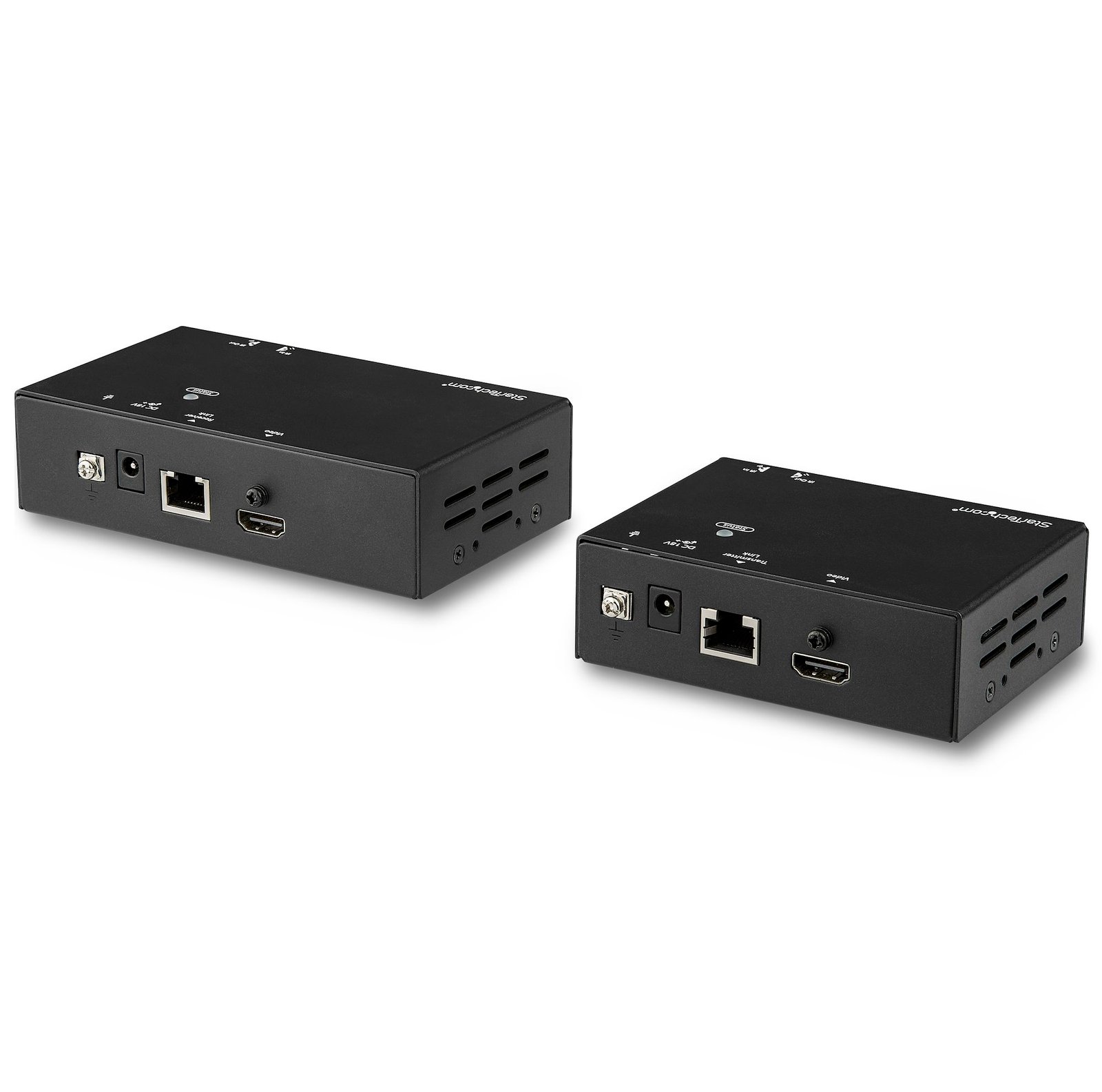
HDMI Over CAT6 Extender - Power Over Cable - Up to 70 m (230 ft.) - TAA
$308.51
Extend HDMI over CAT5e/CAT6 cabling to a remote location, with support for 4K 60Hz at 35 m (115 ft.) and 1080p 60Hz at 70 m (230 ft.)
Specifications & Compliance
- UPC
- 065030877862
- Brand
- StarTech.com
- Included in Package
- 1 - HDMI over CAT6 transmitter, 1 - HDMI over CAT6 receiver, 1 - IR blaster, 1 - IR receiver, 1 - universal power adapter (NA/JP, EU, UK, ANZ), 2 - mounting brackets, 8 - rubber feet, 1 - quick-start guide
- Shipping (Package) Weight
- 3.4 lb [1.6 kg]
- Weight of Product
- 3.5 lb [1.6 kg]
- Product Length
- 9.1 in [23.2 cm]
- Product Width
- 3.0 in [75.0 mm]
- Product Height
- 1.4 in [35.0 mm]
- Package Depth
- 8.3 in [21.2 cm]
- Package Width
- 11.6 in [29.4 cm]
- Package Height
- 2.5 in [64 mm]
- Color
- Black
- Warranty
- 2 Years
- Connector 1
- RJ-45
- Connector 1 (Quantity)
- 1
- Package Quantity
- 1
- Connector 2
- HDMI
- Connector 2 (Quantity)
- 1
- Operating Temperature
- 0°C to 40°C (32°F to 104°F)
- Storage Temperature
- -10°C to 60°C (14°F to 140°F)
- Humidity
- 0% - 80 % RH (non-condensing)
- Material
- Aluminum
- Power Source
- AC Adapter Included
- Input Voltage
- 100 - 240 AC
- Output Voltage
- 18 DC
- Power Consumption
- 18
- LED Indicators
- 1 - status LED (local), 1 - status LED (remote)
- Number of Ports
- 1
- Input Current
- 0.6A
- Output Current
- 1
- Maximum Digital Resolutions
- <b>Up to 35 m:</b> 4K @ 60 Hz<br> <b>Up to 70 m:</b> 1080p @ 60Hz
- Host Connector 1
- HDMI
- Host Connector 1 (Quantity)
- 1
- Audio
- Yes
- Plug Type
- M
- Center Tip Polarity
- Positive
- AV Input
- HDMI
- AV Output
- HDMI
- Wide Screen Supported
- Yes
- Supported Resolutions
- 3840x2160 (4K) @ 60 Hz<br> 2560x1600<br> 1920x1200 @ 60 Hz<br> 1920x1080 (1080p)<br> 1280x720 (720p)
- Maximum Cable Length
- 230.1 ft [70.1 m]
- Host Connector 2
- RJ-45
- Host Connector 2 (Quantity)
- 1
- HDR Support
- HDR
- Cascadable
- No
- Max Distance
- 70m [230ft]
- Cabling
- Cat 5e UTP or better
Questions & Answers
I’m not seeing a video signal on the display. How do I fix this?
The power adapter may not be connected at the correct unit or may not be connected at all. Please check your product manual to see where your power adapter has to be positioned. An adapter to another video signal may be connected to the Transmitter or Receiver unit. Please avoid any converters for the initial setup. The Cat 5 or 6 cable coming from the transmitter or receiver unit may be connected to a network switch. Some of our video extenders will work in this configuration, but others will not. Please check your product manual to see if your model can be used connected to an IP network. For the initial setup, avoid connecting the Cat 5 or 6 cables to any network switch, hub, or router. The category of Unshielded Twisted Pair (UTP) cables may not meet StarTech.com’s requirements. Ensure at least Cat 5, 5e, or six cables are used, and they have eight wires. Some Cat 5 cables only have four wires. If using Cat 6 cables, be aware they have more twists per foot, so you may have to use shorter cable lengths if using Cat 6 cabling between your video extenders. Bundling up the UTP cabling connected to the extenders can cause crosstalk, which will prevent the video signal from showing on the display. Unwrapping the cable should resolve this issue.
The video signal is displayed, but the quality is not very good, or the colors are not accurate. How do I fix this?
Please check to see if your model has an adjustable Gain dial on the remote unit. If it does, use it to adjust the color until it is acceptable. Replace the VGA cable with a higher quality cable like StarTech.com’s MXT101MMHQ.
What DC barrel connector power plug types do StarTech.com products use, and what are their dimensions?
StarTech.com DC barrel connector plug types are defined in the “Plug Type” field of the technical specifications, using a letter code that specifies the connector’s outer diameter (OD) and inner diameter (ID) in millimeters for power adapter compatibility. Explanation: In StarTech.com technical specifications, the “Plug Type” field is a standardized identifier for the exact DC barrel connector size required to power a product. Each plug type is assigned a letter code that corresponds to a specific combination of outer diameter (OD) and inner diameter (ID), measured in millimeters. Common DC barrel plug type dimensions Plug Type OD ID A 2.35 mm 0.7 mm B 4.0 mm 1.7 mm C 4.75 mm 1.7 mm H 3.4 mm 1.3 mm L 5.0 mm 2.5 mm M 5.5 mm 2.1 mm N 5.5 mm 2.5 mm The DC barrel connector plug type must match both the outer diameter and inner diameter exactly. A mismatch between the StarTech.com product requirement and the power adapter connector can prevent proper fit or stable power delivery, which may result in device startup failure or intermittent operation. The plug type defines only the physical connector size. The plug type does not define electrical power requirements such as voltage, current, or polarity. The power adapter used with a StarTech.com product must match the product’s specified electrical requirements. Using an incompatible power adapter can cause device malfunction or permanent damage. This standardized DC barrel connector plug type system enables IT professionals and procurement teams to verify connector dimensions, ensure power adapter compatibility, standardize hardware deployments, and identify the correct replacement power supply for StarTech.com products.
Related products
-

Multi-Input HDBaseT Extender Kit with Built-In Switch and Video Scaler - TAA
$394.99 Add to cart -
4K HDMI Extender Over CAT5/CAT6 Cable, 4K 60Hz HDR Video Extender Up to 230ft (70m), HDMI Over Ethernet Cabling, S/PDIF Audio Out, HDMI Transmitter and Receiver Kit
$228.56 Add to cart -
HDMI over CAT5e Extender with IR and Serial - HDBaseT Extender - 4K - TAA
$379.24 Add to cart -
HDMI over CAT6 Extender Kit - 4K 60Hz
$155.79 Add to cart