
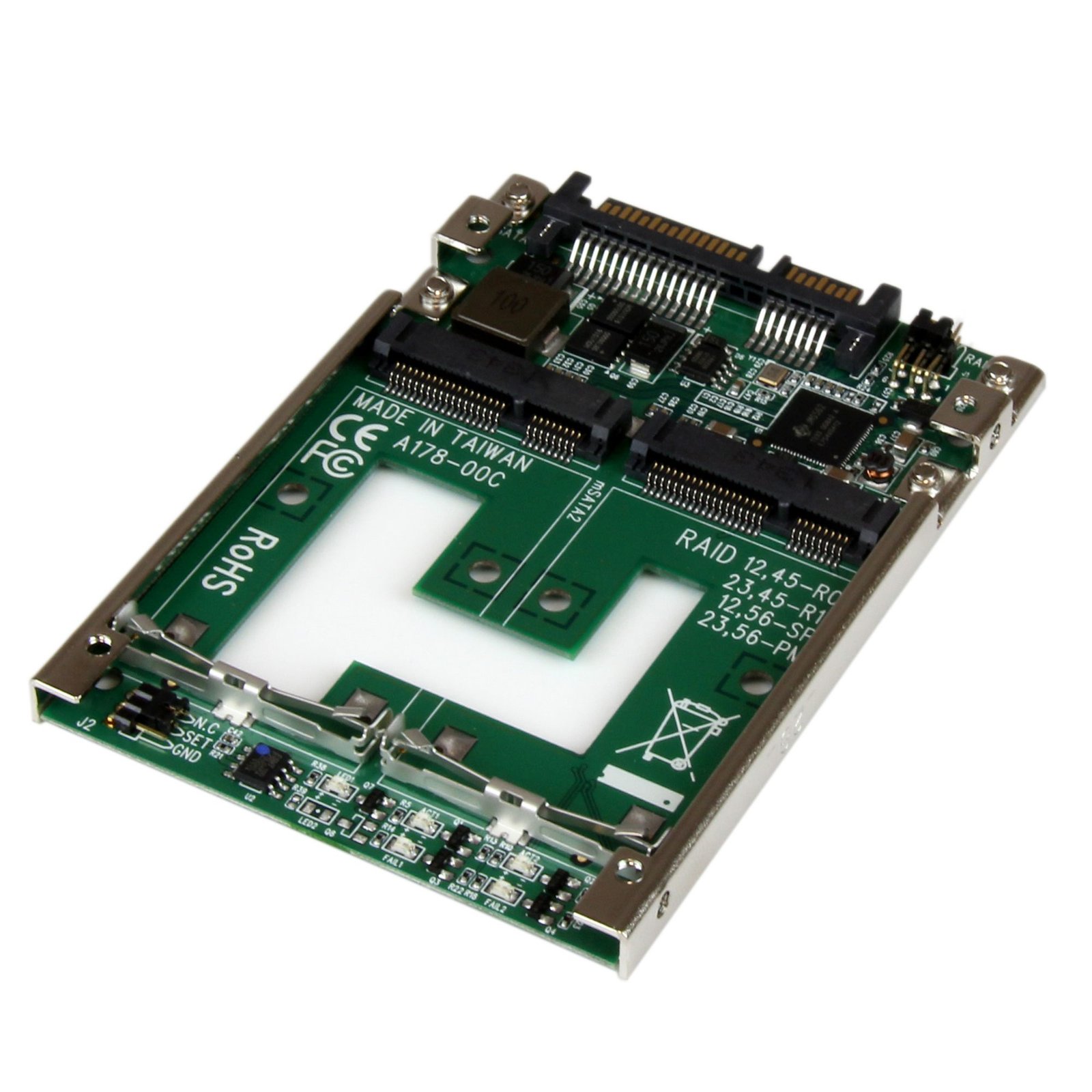
Dual mSATA SSD to 2.5” SATA RAID Adapter Converter - TAA
$21.99
Build a RAID array with two mSATA SSDs that can be installed into a single 2.5in SATA bay
Specifications & Compliance
- UPC
- 065030855617
- Brand
- StarTech.com
- Included in Package
- 1 - Dual mSATA to 2.5in SATA Adapter, 1 - Mounting screw kit, 1 - Install Guide
- Shipping (Package) Weight
- 3.8 oz [108 g]
- Weight of Product
- 1.4 oz [39 g]
- Product Length
- 3.8 in [97 mm]
- Product Width
- 2.8 in [70 mm]
- Product Height
- 0.3 in [7 mm]
- Package Depth
- 5.6 in [14.3 cm]
- Package Width
- 6.9 in [17.5 cm]
- Package Height
- 1.3 in [34 mm]
- Color
- Green
- Warranty
- 2 Years
- Connector 1
- mSATA (52-Pin)
- Connector 1 (Quantity)
- 2
- Package Quantity
- 1
- Operating Temperature
- -40°C to 85°C (-40°F to 185°F)
- Material
- Steel, Aluminum and Plastic
- Maximum Data Transfer Rate
- 6 Gbps
- Chipset ID
- JMicron - JMS562
- Input Voltage
- 5V DC
- Output Voltage
- 5 DC
- MTBF
- 5,101,299 Hours
- LED Indicators
- 1 - Drive #1 Activity, 1 - Drive #1 Failure, 1 - Drive #2 Activity, 1 - Drive #2 Failure
- Interface
- SATA
- Host Connector 1
- SATA (7-Pin + 15-Pin)
- Host Connector 1 (Quantity)
- 1
- SATA Type and Rate
- SATA III (6 Gbps)
- Compatible Drive Types
- mSATA (Mini SATA)
- Number of Drives
- 2
- Drive Size
- mSATA (Full Size & Half Size)
- Drive Installation
- Fixed
- RAID
- Yes
- Hot Swap Capability
- No
- Port Multiplier
- Yes
Questions & Answers
How do I rebuild my RAID array?
In order to rebuild a RAID array, you need to replace a physical drive with an identical drive on the same RAID controller. Although standard RAID levels are generally agreed upon throughout the industry, the implementation varies between manufacturers. RAID arrays are typically not accessible when they are moved to another controller, and data may be unrecoverable if the drives are out of order or have been formatted or accessed by another RAID controller. If a RAID controller has failed, you should get the exact same model of RAID controller. Note: If a drive or drives were damaged, it is possible that the RAID array may be permanently unrecoverable. RAID should not be considered a replacement for backing up your data. If critical data is going onto a RAID array, you should back up the data on another physical drive or logical set of drives. Rebuild a RAID array With the following RAID modes, recovery is possible using the same StarTech.com product. Refer to the following table for the appropriate method to use to recover your RAID array. RAID mode Max # of failed drives Procedure RAID 1 Only one drive is needed for recovery. Determine which drive is operational by using the RAID management utility (if available) or test each drive individually on a different hard drive controller (for example, a hard drive docking station or SATA controller). Replace the failed drive with an identical hard drive. The array will rebuild and is accessible during the rebuilding process. RAID 3 Single drive failure will rebuild. Determine which drive is defective by using the RAID management utility (if available) or with diagnosis LEDs on the controller or enclosure. Replace with an identical hard drive. Note: Do not change the order of the drives. The array may be accessible during the rebuild, but you should let the controller rebuild without interruption so that performance is not compromised. RAID 5 Single drive failure will rebuild. Determine which drive is defective by using the RAID management utility (if available) or with diagnosis LEDs on the controller or enclosure. Replace with an identical hard drive. Note: Do not change the order of the drives. The array may be accessible during the rebuild, but you should let the controller rebuild without interruption so that performance is not compromised. RAID 10 Only one drive in a mirrored set can fail. Determine which drive is defective by using the RAID management utility (if available) or with diagnosis LEDs on the controller or enclosure. Replace with an identical hard drive. Note: Do not change the order of the drives. The array may be accessible during the rebuild, but you should let the controller rebuild without interruption so that performance is not compromised.
What is RAID and What Are the Different RAID Modes?
RAID (Redundant Array of Independent Disks) is a storage technology that combines multiple physical drives into a single logical storage volume. Different RAID modes are designed to improve performance, provide data redundancy, or achieve both depending on the RAID level used. Explanation: RAID combines two or more physical storage drives into a single virtual disk or storage array. Depending on the RAID mode selected, RAID can: Increase storage performance Provide protection against drive failure Combine both performance and redundancy benefits RAID is commonly used in external storage enclosures, servers, workstations, and network storage systems. Not all StarTech.com storage devices support every RAID mode. Refer to the product manual or product page for the RAID modes supported by a specific device. Common RAID terminology includes: Striping: Data is divided and written across multiple drives to improve read and write performance. Mirroring: Identical copies of data are written to multiple drives to provide redundancy. Parity: Calculated data used to rebuild information if a drive fails. RAID does not replace regular data backups. Critical data stored on a RAID array should also be backed up to a separate storage device or backup system. RAID can help protect against hardware failure, but it does not protect against accidental deletion, file corruption, malware, or catastrophic system failure. Refer to the following table for the list of various RAID modes: RAID mode Description Operation Advantages Disadvantages Recovery RAID 0 Striped disks Data is split evenly between two or more disks. Large size and the fastest speed. No redundancy. If one or more drives fails, this results in array failure. RAID 1 Mirrored disks Two or more drives have identical data on them. A single drive failure will not result in data loss. Speed and size is limited by the slowest and smallest disk. Only one drive is needed for recovery. RAID 3 Striped set with dedicated parity Data is split evenly between two or more disks, plus a dedicated drive for parity storage. High speeds for sequential read/write operations. Poor performance for multiple simultaneous instructions. A single drive failure will rebuild. RAID 5 Striped disks with distributed parity Data is split evenly between three or more disks. Parity is split between disks. Large size, fast speed, and redundancy. The total array size is reduced by parity. A single drive failure will rebuild. RAID 10 1+0; Striped set of Mirrored Subset Four or more drives are made into two mirrors that are striped. Larger size and higher speed than RAID-1, and more redundancy than RAID-0. No parity. Only one drive in a mirrored set can fail. JBOD Just a Bunch Of Disks Any number of drives are accessed independently by the operating system. Software RAID modes can be used. Hardware RAID may have better performance. N/A Big Spanning or Concatenation Data is written on one drive until it is full, and then the next drive(s) until it or they are full. Creates a very large and simple array. No redundancy. N/A Clone RAID 1 + Spare Two drives have identical data, plus one drive is used for rebuilding in case of a primary array failure. Seamless operation when one drive fails in a RAID-1 array. Spare drive is not accessible to the user. Only one drive is needed for recovery.
Related products
-

40/44 Pin IDE to Compact Flash SSD Adapter
$9.99 Add to cart -
IDE to SATA Hard Drive or Optical Drive Adapter - 40-Pin PATA to 2.5" SATA HDD/SSD/ODD Converter - TAA
$22.54 Add to cart -

IDE to SATA Adapter Converter
$18.99 Add to cart -
U.2 (SFF-8643) to M.2 PCI Express 4.0 x4 Host Adapter Card for 2.5" U.2 NVMe SSD - TAA
$23.56 Add to cart