
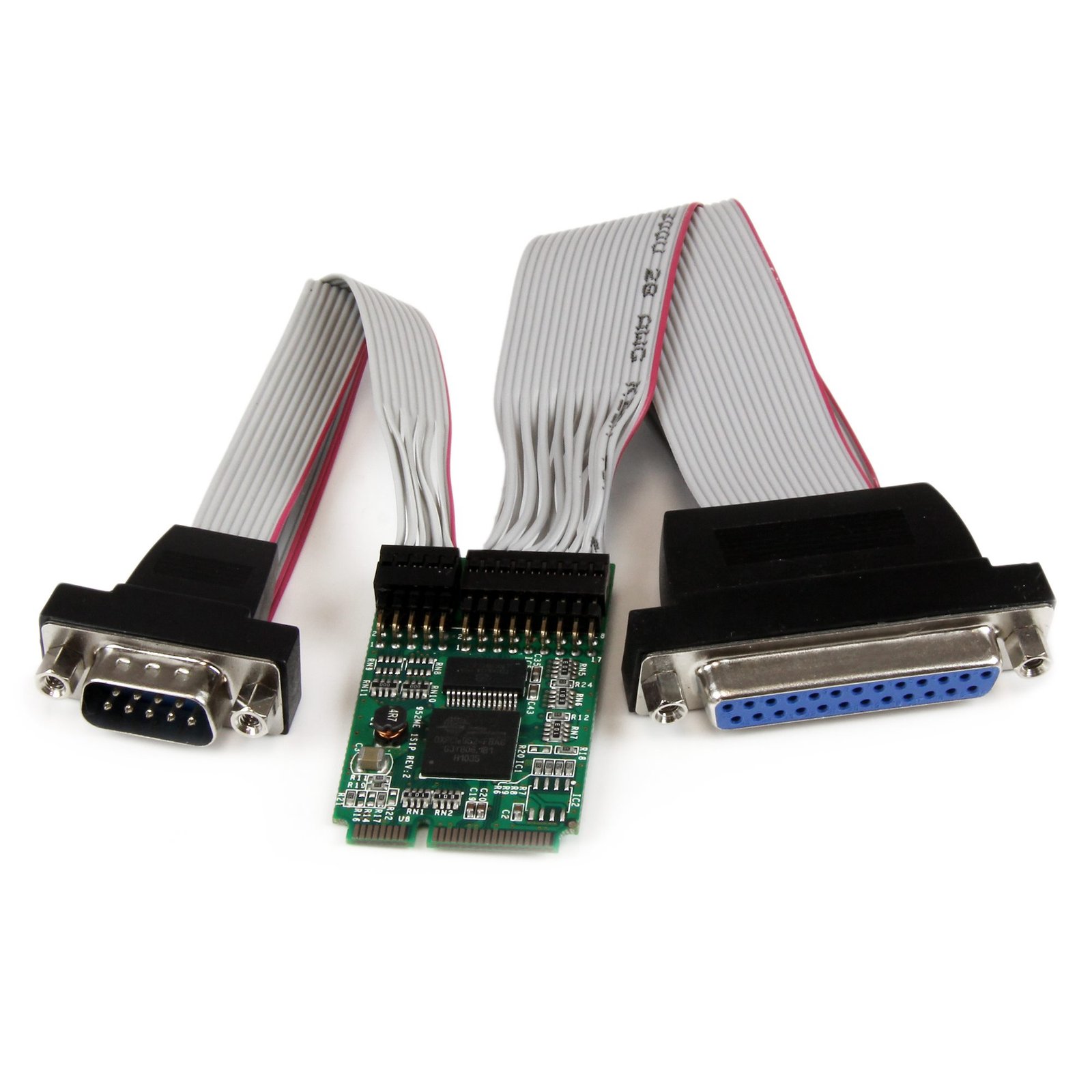
1S1P Mini PCI Express Serial Parallel Card w/ 16950 UART
$82.99
Add Serial and Parallel support to Embedded Systems via mini PCI Express
Specifications & Compliance
- UPC
- 065030835299
- Brand
- StarTech.com
- Included in Package
- 1 - Mini-PCIe Controller Board, 1 - DB25 to board adapter, 1 - DB9 to board adapter, 1 - DB25 and DB9 bracket, 1 - DB25 bracket, 1 - DB9 bracket, 1 - Driver CD, 1 - Instruction Manual
- Shipping (Package) Weight
- 8.5 oz [240 g]
- Weight of Product
- 0.2 oz [6.2 g]
- Product Length
- 2.0 in [50 mm]
- Product Width
- 1.2 in [30 mm]
- Product Height
- 0.2 in [6 mm]
- Package Depth
- 1.6 in [41 mm]
- Package Width
- 8.3 in [21.1 cm]
- Package Height
- 5.6 in [14.3 cm]
- Cable Length
- 9.1 in [23 cm]
- Warranty
- Lifetime
- Connector 1
- Mini PCI Express x1
- Connector 1 (Quantity)
- 1
- Package Quantity
- 1
- Connector 2
- DB-9 Serial
- Connector 2 (Quantity)
- 1
- Operating Temperature
- -10°C to 80°C (14°F to 176°F)
- Storage Temperature
- -20°C to 100°C (-4°F to 212°F)
- Humidity
- 5~85% RH
- Industry Standards
- PCI Express 1.1, PCI Power Management 1.2
- Chipset ID
- PLX/Oxford - OXPCIe952
- Connector 3
- DB-25 Parallel / Serial
- Connector 3 (Quantity)
- 1
- Number of Ports
- 1
- Interface
- Serial, Parallel
- Bus Type
- Mini PCI Express
- Card Type
- Embedded
- Port Style
- Dongle (Included)
- Serial Protocol
- RS-232
- Max Baud Rate
- 460.8 Kbps
- FIFO
- 128 Bytes
- Data Bits
- 5, 6, 7, 8, 9
- Microsoft WHQL Certified
- Yes
Questions & Answers
How can I make sure my serial port is working in Windows?
To check whether or not an RS-232 serial port is working, perform an RS-232 loopback test by doing the following: If your serial port is not female, convert it by taking a female/female cable or gender changer and plugging it into the serial port. Take a metal paperclip or wire and cross pins 2 and 3. If you look closely at the female end, the pins should be numbered. Open a telnet session on the COM port number of the device that you are testing. To find out the COM port number, refer to the following FAQ: https://www.startech.com/faq/com-port-listing-windows . Note: To open a telnet session on the COM port, you need a telnet client like PuTTY or Hyper Terminal. Windows XP comes with Hyper Terminal. When the session is open, anything you type into it you should see. The loopback test fails when you cannot see what you are typing. If the loopback test fails, make sure that the serial cable or gender changer that you are using works and that the adapter is in the correct port. You can check multiple ports at the same time by opening multiple sessions, putting the loopback adapter on one port, and trying to type into each session. When you can see what you are typing, you know that the COM port is working and you can see which port number the physical serial port is. Close the window for the port that you just tested to speed up the testing of the remaining serial ports. For products related to this article, click here .
Everything is hooked up but nothing is working. What should I do? (Windows)
When you troubleshoot issues with a serial or parallel hybrid device, there are some quick tests that you can complete to rule out potential problems. You can test to make sure that the following components are working correctly and are not the source of the issue: Serial or parallel cables Serial or parallel ports Serial or parallel devices To test your setup components, try the following: Use the serial or parallel cable, serial or parallel port, and serial or parallel device in another setup to see if the problem is with the components or the setup. Use a different serial or parallel cable, serial or parallel port, and serial or parallel device in your setup to see if the problem persists. Ideally, you should test a component that you know works in another setup. When you test your cables, it is recommended that you do the following: Test each cable individually. Use short cables when you are testing. When you test the serial or parallel ports and serial or parallel device, it is recommended that you do the following: Press the Windows key + R , type devmgmt.msc , and press Enter to open Device Manager . Check to see if your device is listed under Ports (COM & LPT) . Make sure that the COM or LPT port number is the correct number for the serial or parallel device and that the software being used to connect the computer to the serial or parallel device uses the correct COM or LPT port number. If you do not see the COM or LPT port number in Device Manager see this FAQ for PCI/PCIe expansion cards: https://www.startech.com/en-us/faq/pci-pcie-cannot-boot-os-or-detect-windows or this FAQ for USB devices: https://www.startech.com/en-us/faq/usb-cannot-detect-windows If the device is listed with an error, follow the instructions on the website to reinstall the drivers. Note: Some serial devices work only if the COM or LPT port number is between a certain range. For example, COM1 to COM4 for serial and LPT1 and LPT2 for parallel. Perform a serial loopback test. See this FAQ on how to perform a RS-232 serial loopback test: http://www.startech.com/faq/serial_loopback_test_rs232_windows Note: There is not an equivalent loopback test that can be performed for parallel devices.
How do I confirm that Windows detects my expansion card?
To confirm that Windows detects your expansion card, complete the following: Press the Windows key+ R , type devmgmt.msc , and press Enter . In Device Manager , under the appropriate heading, confirm that your expansion card is listed and that there isn't an exclamation mark next to it. For example, a USB controller card would be under Universal Serial Bus controllers . Your expansion card is listed according to the name of the chipset. To determine the name of the chipset of your expansion card, navigate to www.StarTech.com and look on the Technical Specifications tab for your product.
Is the PEX1S1PMINI compatible with a Mini PCI-Express slot that supports mSATA?
No, the PEX1S1PMINI is not compatible with Mini PCI-Express slots that are electrically configured for mSATA. Explanation: Although mSATA and Mini PCI-Express connectors use the same physical form factor, they are not electrically compatible. The PEX1S1PMINI requires a standard PCI Express Mini Card interface and does not function in slots that support only mSATA. Some Intel® motherboards label their slot as “Mini PCI-Express with mSATA support.” In these systems, the slot uses the Mini PCI-Express connector but operates electrically as an mSATA interface. When the PEX1S1PMINI is installed in one of these slots, the motherboard may detect the card as an mSATA device in the BIOS, but the card will not function correctly because the required PCI Express signaling is not supported.
Related products
-

1 Port CardBus PCMCIA RS422 RS485 Serial Laptop Adapter Card
$69.99 Add to cart -

2ft (60cm) 2-Port USB to Serial Adapter Cable, Interchangeable DB9 Screws/Nuts, COM Retention, USB-A to DB9 RS232, FTDI, Level-4 ESD Protection, Windows/macOS/ChromeOS/Linux - Rugged TPE Construction
$66.61 Add to cart -
4 Port CardBus RS232 Serial Laptop PC Adapter Card - 16950
$155.99 Add to cart -

Product
$0.00 Add to cart