
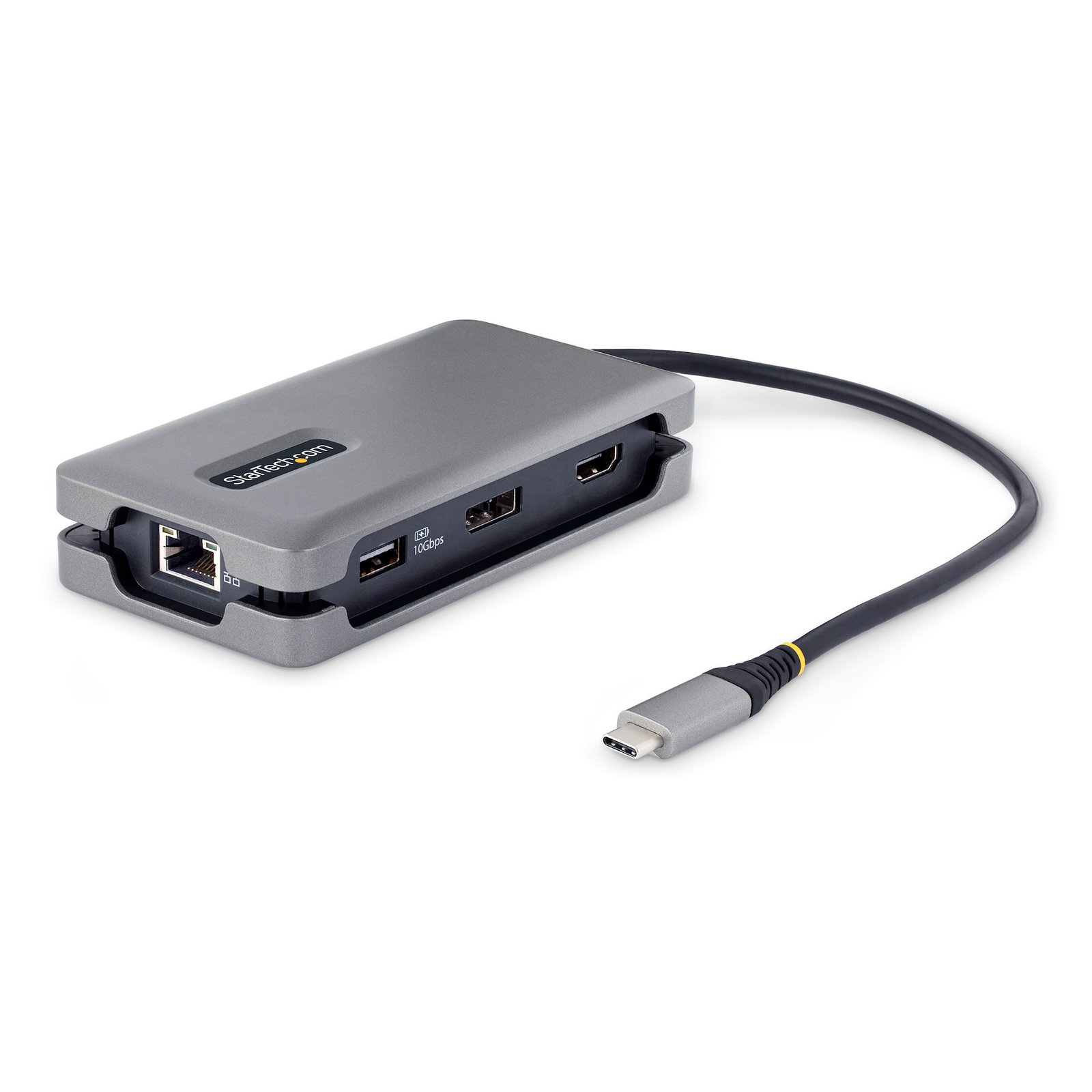
USB-C Multiport Adapter - 4K 60Hz HDMI/DP - 3-Port USB Hub - 100W Power Delivery Pass-Through - GbE - Travel Mini Docking Station w/ Charging - 1ft/30cm Wrap-Around Cable
$71.74
Create a workstation, with a single-4K 60Hz HDMI or DisplayPort, multiple USB ports, Gigabit Ethernet, and 100W Power Delivery pass-through
Specifications & Compliance
- UPC
- 065030893077
- Brand
- StarTech.com
- Included in Package
- 1 - USB-C Multiport Adapter, 1 - Quick-Start Guide
- Shipping (Package) Weight
- 5.9 oz [166 g]
- Weight of Product
- 4.6 oz [130.0 g]
- Product Length
- 4.9 in [12.4 cm]
- Product Width
- 2.5 in [64.0 mm]
- Product Height
- 1.0 in [25.0 mm]
- Package Depth
- 5.8 in [14.7 cm]
- Package Width
- 6.7 in [17 cm]
- Package Height
- 1.2 in [31 mm]
- Color
- Space Gray
- Cable Length
- 12.6 in [32 cm]
- Warranty
- 3 Years
- Connector 1
- HDMI
- Connector 1 (Quantity)
- 1
- Package Quantity
- 1
- Connector 2
- DisplayPort
- Connector 2 (Quantity)
- 1
- Operating Temperature
- 0°C to 50°C (32°F to 122°F)
- Storage Temperature
- -20°C to 55°C (-4°F to 158°F)
- Humidity
- 0% to 85% (non-condensing)
- Material
- Plastic
- Maximum Data Transfer Rate
- 10Gbps
- Industry Standards
- HDMI 2.0b, DisplayPort 1.4
- Power Source
- Bus Powered and Host USB-C Power Adapter
- Chipset ID
- Realtek - RTL8153, Realtek - RTL2142, VIA - VL822-Q8, VIA - VL103
- Special Notes
- Jumbo Frames are no longer supported in macOS, Not all USB-C ports support the full functionality of the USB Type-C standard. Ensure that the host's USB-C port supports USB Power Delivery and DP alt mode., If the USB-C Host does not support USB Power Delivery, the PD Power Port will not supply power to the USB-C Host., USB 3.2 Gen 2 (10Gbps) is also known as SuperSpeed USB 10Gbps, and USB 3.1 Gen 2 (10Gbps)., The host laptop may have specific charging requirements. For example, if the laptop requires exactly 60W of power and an adapter consumes some of the 60W, your laptop might not recognize that it is getting enough power. For information pertaining to Power Delivery capability, refer to the technical documents included with the host laptop.
- Power Delivery
- 100W
- Connector 3
- USB-A (10Gbps, 4.5W)
- Connector 3 (Quantity)
- 2
- Power Consumption
- 15W
- LED Indicators
- 1 - Network Link Speed - Green (Network Operating at 1Gbps or 100Mbps), Off (Network Operating at 10Mbps or Lower), 1 - Network Link Status - Solid Amber (Link Detected), Flashing Amber (Link Activity), Off (No Link Detected)
- Number of Ports
- 3
- Interface
- USB 3.2 Gen 2 (10 Gbps)
- Bus Type
- USB-C
- Type and Rate
- USB 10Gbps
- System and Cable Requirements
- A host laptop with an available USB-C port (to ensure full adapter functionality, the host USB-C port must support USB Power Delivery 3.0 and DP alt mode).
- Maximum Digital Resolutions
- 4K (4096 × 2160) 60Hz
- Host Connector 1
- USB-C (10Gbps, 4.5W)
- Host Connector 1 (Quantity)
- 1
- Compatible Networks
- 10/100/1000 Mbps
- Connector 4 (Quantity)
- 1
- General Specifications
- Maximum Laptop Charging: 85W
- Number of Displays
- 1
- UASP Support
- Yes
- Connector 5
- USB-C (100W PD Only)
- Connector 5 (Quantity)
- 1
- Full Duplex Support
- Yes
- Fast-Charge Port(s)
- No
- Connector 6
- RJ-45
- Connector 6 (Quantity)
- 1
- Wake-On-LAN (WOL)
- Yes
- Displays Supported
- 1
- 4K Support
- Yes
- PXE
- Yes
Questions & Answers
Why are my USB peripherals disconnecting on high power draw?
This product features Overcurrent Protection on the downstream USB ports and the device may cut power to peripherals connected to the ports if they exceed the maximum allotted current. The USB ports support the respective rated current in Table A below, however the overall device power output is limited by the host or (if included) power connection. Table A. USB port voltage and current ratings. Specification Connector Output Voltage (VDC) Rated Current (mA) USB 1.1 USB-A 4.40 - 5.25 500 USB 2.0 USB-A 4.40 - 5.25 500 USB 3.2 (1 lane) USB-A; USB-C* 4.75 - 5.50 900 USB 3.2 (2 lanes) USB-A; USB-C* 4.75 - 5.50 1500 BC 1.2 USB-A; USB-C* 4.75 - 5.50 1500 USB-C (1.5A) USB-C* 4.75 - 5.50 1500 USB-C (3A) USB-C* 4.75 - 5.50 3000 *USB-C spec supersedes the USB 3.2 spec for current limitations. If Overcurrent Protection is activated but then the current draw on the downstream device drops back below an acceptable level, the USB device will reconnect. This may result in a continuous connection/disconnection cycle. To stop the cycle, disconnect the device from the product for 15-20 seconds and then reconnect it to a different USB port. If the connection/disconnection cycle occurs again, even when device is connected to a different or higher powered USB port on the product, then the USB device is not compatible with this product.
Related products
-
USB C Multiport Adapter - Portable USB-C Dock with 4K HDMI - 100W PD 3.0 Pass-Through, 1x USB-A, 1x USB-C, GbE - Thunderbolt 3 & USB Type-C Laptop Travel Dock - Mac & Windows
$64.56 Add to cart -

USB C Multiport Adapter, Dual 4K Monitor, USB-C to Dual HDMI Adapter, 2x USB-A Ports, 100W PD 3.0, Gigabit LAN Port - Replaced by 120B-USBC-MULTIPORT
$168.09 Add to cart -
USB-C VGA Multiport Adapter - USB 3.0 Port - 60W PD
$27.99 Add to cart -
USB-C Multiport Adapter with Wireless Presenter Remote
$128.99 Add to cart