
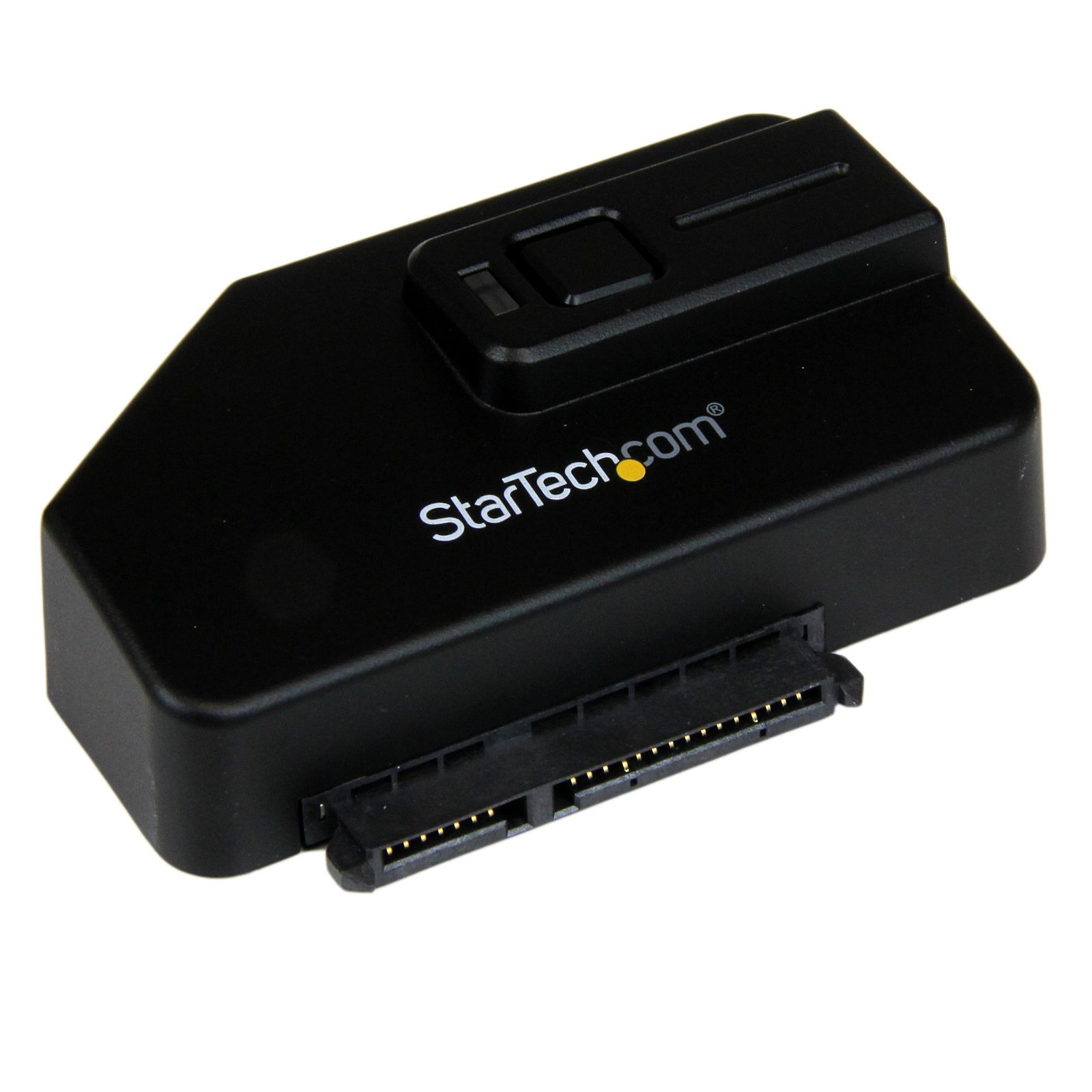
USB 3.0 to SATA III Adapter for 2.5in or 3.5in Drives
$45.99
Easily connect, transfer and backup data from a 2.5in or 3.5in SATA drive to your PC or Notebook using USB 3.0
Specifications & Compliance
- UPC
- 065030850667
- Brand
- StarTech.com
- Included in Package
- 1 - USB 3.0 to SATA Converter, 1 - USB 3.0 A to B cable, 1 - Universal Power Adapter, 3 - Power Adapter Plug (NA/ UK/ EU), 1 - Software CD, 1 - Instruction Manual
- Shipping (Package) Weight
- 12.5 oz [354 g]
- Weight of Product
- 1.2 oz [32.7 g]
- Product Length
- 2.7 in [69.4 mm]
- Product Width
- 1.9 in [47.3 mm]
- Product Height
- 0.9 in [21.6 mm]
- Package Depth
- 6.2 in [15.7 cm]
- Package Width
- 9.1 in [23 cm]
- Package Height
- 2.2 in [55 mm]
- Color
- Black
- Warranty
- 2 Years
- Connector 1
- SATA (7-Pin + 15-Pin)
- Connector 1 (Quantity)
- 1
- Package Quantity
- 1
- Operating Temperature
- 0°C ~ 50°C (32°F ~ 122°F)
- Storage Temperature
- 20°C ~ 60°C (68°F ~ 140°F)
- Humidity
- 5% ~ 85% RH
- Material
- Plastic
- Power Source
- AC Adapter Included
- Chipset ID
- ASMedia - ASM1051E
- Input Voltage
- 110V-240V AC
- Output Voltage
- 12V DC
- LED Indicators
- 1 - Amber - Power (solid) /Activity (flashing)
- Interface
- USB 3.2 Gen 1 (5Gbps)
- Input Current
- 0.6A
- Output Current
- 1.5
- Type and Rate
- USB 3.0 (5Gbps)
- System and Cable Requirements
- Host computer system with available USB port (USB 3.0 recommended)
- Host Connector 1
- USB-B (5Gbps, 4.5W)
- Host Connector 1 (Quantity)
- 1
- Plug Type
- M
- Center Tip Polarity
- Positive
- UASP Support
- Yes
- SATA Type and Rate
- SATA III (6 Gbps)
- Compatible Drive Types
- SATA
- Number of Drives
- 1
- Max Drive Capacity
- Currently tested up to 4TB
Questions & Answers
Why does my USB device stop working after my computer wakes back up from sleep mode in Windows?
If the USB device does not work after your computer has been in extended hibernation, it is likely that Windows has automatically turned off the USB Root hub to save power. The steps below outline how to configure the USB root hub to stay on during hibernation, to prevent this from happening. Windows 10 / 8 On your keyboard, press the Windows key + X and select Control Panel . Click Hardware and Sound , then click Power Options . Click Change plan settings for the plan you want to change. Click Change advanced power settings . Click the plus sign (+) next to “USB settings” and “USB selective suspend setting” to expand the options and change the setting to Disabled . Click OK to apply the setting. Note : You may need to disconnect and re-connect your USB device after applying these settings to re-establish the connection. Windows 7 / Vista Click the Start button and select Control Panel . Click Hardware and Sound , then click Power Options . Click Change plan settings for the plan you want to change. Click Change advanced power settings . Click the plus sign (+) next to “USB settings” and “USB selective suspend setting” to expand the options and change the setting to Disabled . Click OK to apply the setting. Note : You may need to disconnect and re-connect your USB device after applying these settings to re-establish the connection. Windows XP On your desktop, right-click the My Computer icon and select Properties . Click the Device Manager tab. Expand Universal Serial Bus controllers by clicking the arrow to the left of it. Right-click the first USB Root Hub device and select Properties . Click the Power Management tab. Clear the box next to Allow the computer to turn off this device to save power . Click OK to apply the setting. Repeat steps 4-7 for any remaining devices in the Universal Serial Bus Controllers section with “ Root Hub ” in the name. Note : You may need to disconnect and re-connect your USB device after applying these settings to re-establish the connection.
Do USB to SATA or NVMe adapters support TRIM on Windows, macOS, or Linux?
TRIM is supported on Windows only for select USB to SATA or USB to NVMe adapters. TRIM is not supported on macOS or Linux. Explanation: TRIM support for USB storage adapters is limited and depends on both the operating system and the specific product. On Windows, only select adapters support TRIM, and this capability is explicitly listed in the product’s Technical Specifications under the Performance section as “TRIM Support – Yes.” If this entry is not present, the product does not support TRIM. On macOS and Linux, TRIM is not supported for USB storage adapters due to operating system limitations in standard configurations. While some third‑party utilities on macOS or manual system modifications on Linux may enable TRIM in certain scenarios, these configurations are not supported. This limitation applies specifically to USB storage adapters and does not apply to SATA controller cards.
What DC barrel connector power plug types do StarTech.com products use, and what are their dimensions?
StarTech.com DC barrel connector plug types are defined in the “Plug Type” field of the technical specifications, using a letter code that specifies the connector’s outer diameter (OD) and inner diameter (ID) in millimeters for power adapter compatibility. Explanation: In StarTech.com technical specifications, the “Plug Type” field is a standardized identifier for the exact DC barrel connector size required to power a product. Each plug type is assigned a letter code that corresponds to a specific combination of outer diameter (OD) and inner diameter (ID), measured in millimeters. Common DC barrel plug type dimensions Plug Type OD ID A 2.35 mm 0.7 mm B 4.0 mm 1.7 mm C 4.75 mm 1.7 mm H 3.4 mm 1.3 mm L 5.0 mm 2.5 mm M 5.5 mm 2.1 mm N 5.5 mm 2.5 mm The DC barrel connector plug type must match both the outer diameter and inner diameter exactly. A mismatch between the StarTech.com product requirement and the power adapter connector can prevent proper fit or stable power delivery, which may result in device startup failure or intermittent operation. The plug type defines only the physical connector size. The plug type does not define electrical power requirements such as voltage, current, or polarity. The power adapter used with a StarTech.com product must match the product’s specified electrical requirements. Using an incompatible power adapter can cause device malfunction or permanent damage. This standardized DC barrel connector plug type system enables IT professionals and procurement teams to verify connector dimensions, ensure power adapter compatibility, standardize hardware deployments, and identify the correct replacement power supply for StarTech.com products.
Related products
-
1.8in Micro SATA to Compact Flash Solid State Drive Enclosure Adapter
$23.99 Add to cart -

PCMCIA to Compact Flash Adapter
$21.99 Add to cart -
SATA Drive to mSATA Host Adapter for 2.5in / 3.5in SATA Drives - TAA
$19.46 Add to cart -

1.8in 50 Pin IDE to Compact Flash Solid State Drive Enclosure Adapter
$11.99 Add to cart