
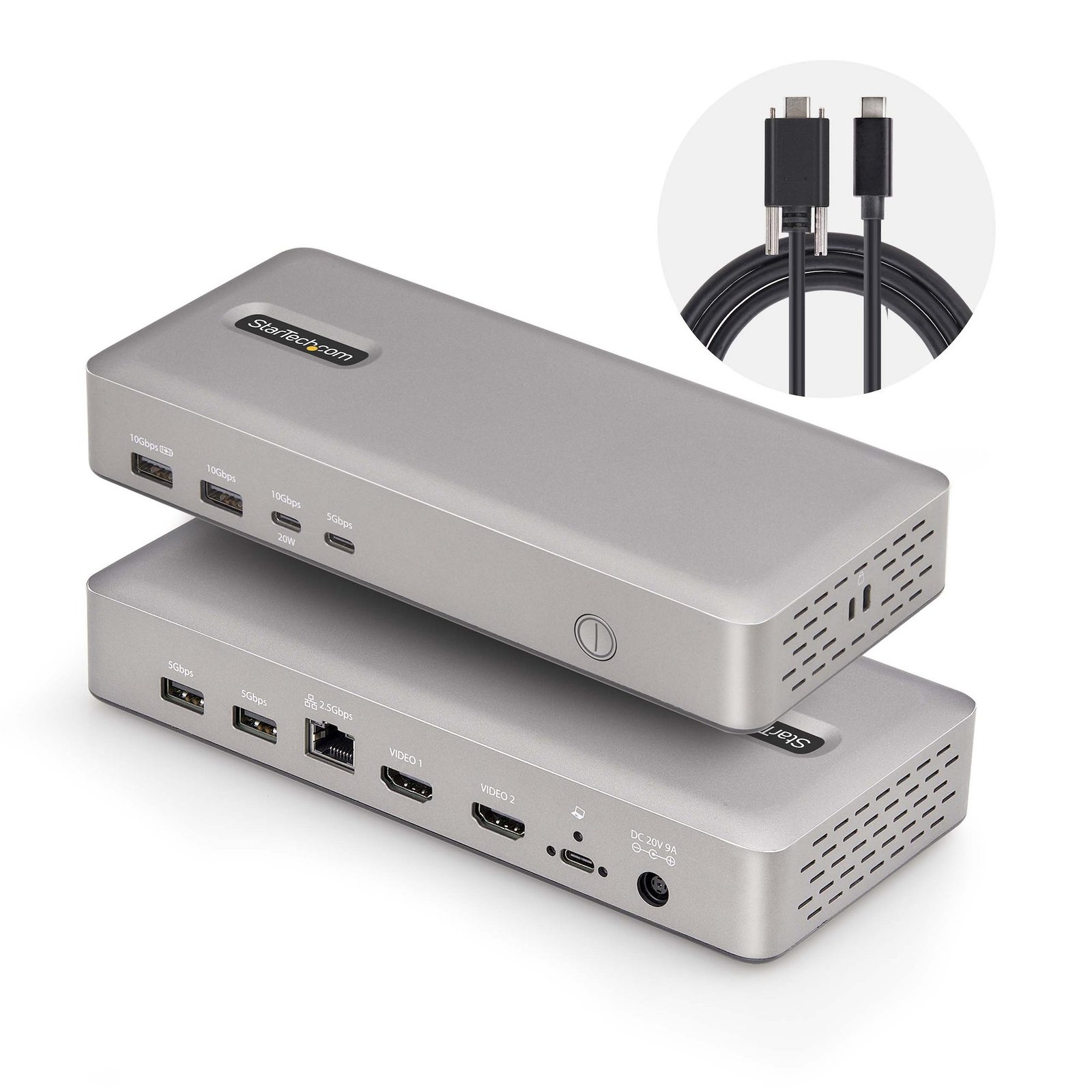
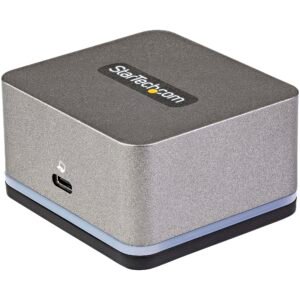
Dual-Monitor USB4 Docking Station, Dual 4K 120Hz or Single 8K 60Hz HDMI, 100W Laptop Charging, 2.5GbE, USB-C Multi-Monitor Dock, Driverless
$215.99
Turn your USB4 laptop into a multi-monitor high-resolution workstation with 6 USB ports, 2.5 Gigabit Ethernet and 100W Laptop Charging
Specifications & Compliance
- UPC
- 065030899673
- Brand
- StarTech.com
- Included in Package
- 1 - Docking Station, 1 - 3 ft [1 m] USB4 Host Cable, 1 - Universal Power Adapter (North America), 1 - Quick-Start Guide
- Shipping (Package) Weight
- 2.6 lb [1.2 kg]
- Weight of Product
- 13.8 oz [392 g]
- Product Length
- 3.8 in [95.4 mm]
- Product Width
- 8.3 in [21.0 cm]
- Product Height
- 1.3 in [33.9 mm]
- Package Depth
- 9.2 in [23.3 cm]
- Package Width
- 5.7 in [14.6 cm]
- Package Height
- 3.6 in [91 mm]
- Color
- Space Gray
- Warranty
- 3 Years
- Connector 1
- HDMI
- Connector 1 (Quantity)
- 2
- Package Quantity
- 1
- Connector 2
- USB-A (10Gbps, 7.5W)
- Connector 2 (Quantity)
- 1
- Operating Temperature
- 0°C to 70°C (32°F to 158°F)
- Storage Temperature
- -20 to 70°C
- Humidity
- 0% to 95% (non-condensing) at 25°C
- Material
- Plastic
- Maximum Data Transfer Rate
- 40Gbps
- Industry Standards
- USB4 (40Gbps), USB 3.2 Gen 2 (10Gbps), USB 3.2 Gen 1 (5Gbps), USB Power Delivery 3.0, USB Battery Charging Specification 1.2
- Power Source
- AC Adapter Included
- Chipset ID
- VIA - VL830, VIA - VL163, Realtek - RTD2188-VA-CG, Genesys Logic - GL9901NE, Realtek - RTL8156BG
- Power Delivery
- 100W
- Input Voltage
- 110V-240V AC
- Output Voltage
- 20V DC
- Connector 3
- USB-A (10Gbps, 4.5W)
- Connector 3 (Quantity)
- 1
- Power Consumption
- 165W
- MTBF
- 10,000 Hours
- LED Indicators
- 1 - Power LED
- Interface
- USB4 (40Gbps)
- Input Current
- 2.5 A
- Output Current
- 9
- Maximum Digital Resolutions
- <b><u>Dual Display</u><br> 4:4:4</b> - 2x 4K (3840 x 2160) 60Hz<br> <b>4:2:2</b> - 2x 4K (3840 x 2160) 120Hz <br> <br> <b><u>Single Display</u><br> 4:4:4</b> - 8K (7680 x 4320) 30Hz<br> <b>4:2:2</b> - 8K (7680 x 4320) 60Hz
- Host Connector 1
- USB-C (40Gbps, 100W PD Input)
- Host Connector 1 (Quantity)
- 1
- Plug Type
- M
- Compatible Networks
- 2.5G/1G/100Mbps/10Mbps
- Center Tip Polarity
- Positive
- Connector 4
- USB-A (5Gbps, 4.5W)
- Connector 4 (Quantity)
- 2
- Number of Displays
- 2
- UASP Support
- Yes
- Connector 5
- USB-C (5Gbps, 4.5W)
- Connector 5 (Quantity)
- 1
- Full Duplex Support
- Yes
- Fast-Charge Port(s)
- Yes
- Connector 6
- USB-C (10Gbps, 20W)
- Connector 6 (Quantity)
- 1
- Wake-On-LAN (WOL)
- Yes
- Displays Supported
- 2
- 4K Support
- Yes
- Connector 7
- RJ-45
- Connector 7 (Quantity)
- 1
- PXE
- Yes
- Compatible Lock Slot
- Kensington Standard Slot (K-Slot), Kensington Nano Slot
- Number of Battery Charge 1.2 Ports
- 2
- Supported Charging Outputs
- BC 1.2 (1.5A), USB-C (20W)
Questions & Answers
How do I install my network card in Windows Vista, Windows 7, Windows 8, Windows 10, or Windows 11? (.exe method)
To install your network card in Windows, download the latest driver package from StarTech.com, extract the files, run Setup.exe as an administrator, and restart the computer if prompted. Explanation: Before installing the network card, ensure that Windows is fully updated with the latest service packs, security updates, and feature updates available for your operating system. To install the driver: Download the latest driver package from the StarTech.com Drivers & Downloads page. Extract the contents of the downloaded ZIP file. Open the folder for your version of Windows, if applicable. Right-click Setup.exe and select Run as administrator . Follow the on-screen instructions to install the driver. Restart the computer if prompted. After Windows restarts, the operating system will complete the driver installation and the network card will be ready to use. Note: If Run as administrator is not available, ensure that you are running Setup.exe from the extracted folder rather than directly from the ZIP file.
What DC barrel connector power plug types do StarTech.com products use, and what are their dimensions?
StarTech.com DC barrel connector plug types are defined in the “Plug Type” field of the technical specifications, using a letter code that specifies the connector’s outer diameter (OD) and inner diameter (ID) in millimeters for power adapter compatibility. Explanation: In StarTech.com technical specifications, the “Plug Type” field is a standardized identifier for the exact DC barrel connector size required to power a product. Each plug type is assigned a letter code that corresponds to a specific combination of outer diameter (OD) and inner diameter (ID), measured in millimeters. Common DC barrel plug type dimensions Plug Type OD ID A 2.35 mm 0.7 mm B 4.0 mm 1.7 mm C 4.75 mm 1.7 mm H 3.4 mm 1.3 mm L 5.0 mm 2.5 mm M 5.5 mm 2.1 mm N 5.5 mm 2.5 mm The DC barrel connector plug type must match both the outer diameter and inner diameter exactly. A mismatch between the StarTech.com product requirement and the power adapter connector can prevent proper fit or stable power delivery, which may result in device startup failure or intermittent operation. The plug type defines only the physical connector size. The plug type does not define electrical power requirements such as voltage, current, or polarity. The power adapter used with a StarTech.com product must match the product’s specified electrical requirements. Using an incompatible power adapter can cause device malfunction or permanent damage. This standardized DC barrel connector plug type system enables IT professionals and procurement teams to verify connector dimensions, ensure power adapter compatibility, standardize hardware deployments, and identify the correct replacement power supply for StarTech.com products.
Related products
-
Dual-Monitor USB-C Dock for Windows® - 2.5” SATA SSD/HDD Bay
$286.99 Add to cart -
Triple-Monitor USB4 Docking Station, 4K 60Hz HDMI or DisplayPort, 100W Laptop Charging, 2.5GbE, USB-C Multi-Monitor Dock, Driverless
$193.99 Add to cart -
USB-C Triple Monitor Docking Station for MacBook Pro / Air M1 M2 M3 M4 M5 & Windows, Universal 4K HDMI DP Dock, Thunderbolt Compatible, 100W Laptop Charging - TAA
$170.99 Add to cart -
USB C Mini Dock for Chromebooks, iPad Pro, Android Tablets/Smartphones, USB-C Chromebook Docking Station w/ 4K 30Hz HDMI, 27W Power Delivery Charging, 3-Port USB Hub, Gigabit Ethernet - TAA
$68.66 Add to cart