
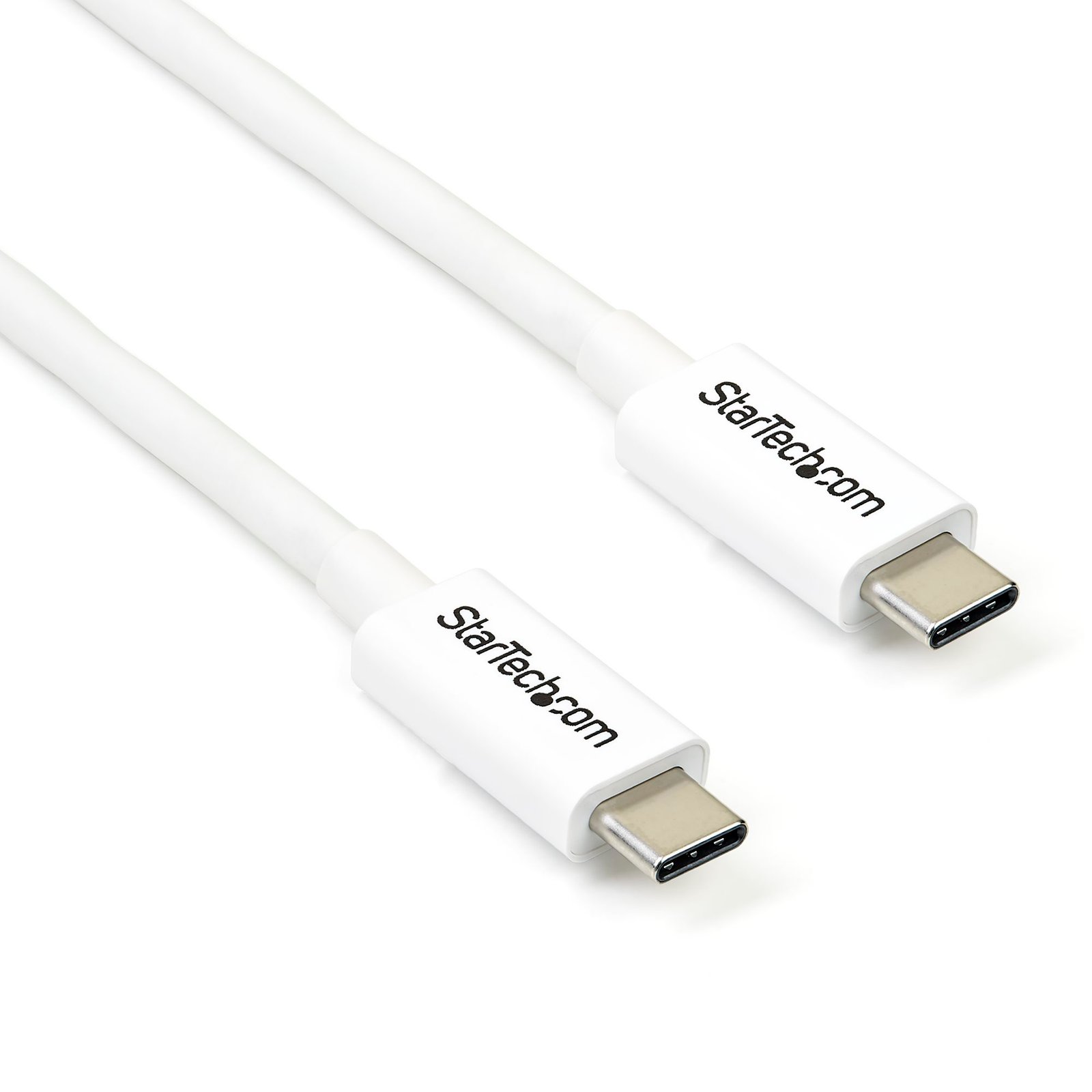
6.6ft (2m) Thunderbolt 3 Cable, 20Gbps, 100W PD, 4K, Thunderbolt Certified, Compatible with Thunderbolt 4/USB 3.2/DisplayPort
$57.39
Provide twice the data transfer speed of any other cable type, enable full 4K 60Hz video, and power your devices with a single cable
Specifications & Compliance
- UPC
- 065030871266
- Brand
- StarTech.com
- Included in Package
- 1 - Thunderbolt 3 cable
- Shipping (Package) Weight
- 3.4 oz [96 g]
- Weight of Product
- 3.0 oz [85.0 g]
- Product Length
- 6.6 ft [2.0 m]
- Product Width
- 0.5 in [12.4 mm]
- Product Height
- 0.3 in [6.5 mm]
- Package Depth
- 3.5 in [88 mm]
- Package Width
- 6.5 in [16.6 cm]
- Package Height
- 1.2 in [30 mm]
- Color
- White
- Cable Length
- 6.6 ft [2 m]
- Warranty
- 2 Years
- Connector 1
- USB-C (Thunderbolt 20Gbps)
- Connector 1 (Quantity)
- 1
- Package Quantity
- 1
- Connector 2 (Quantity)
- 1
- Cable Jacket Material
- PVC - Polyvinyl Chloride
- Connector Plating
- Nickel
- Power Delivery
- 100W
- Cable Shield Material
- Aluminum-Mylar Foil with Braid
- Output Current
- 5
- Type and Rate
- Thunderbolt 3 - 20 Gbit/s
Questions & Answers
Everything is hooked up but nothing is working. What should I do?
When you troubleshoot issues with a Thunderbolt cable there are some quick tests that you can complete to rule out potential problems. You can test to make sure that the following components are working correctly and are not the source of the issue: Thunderbolt peripheral Thunderbolt port Thunderbolt cable To test your setup components, try the following: Use the Thunderbolt peripheral, port, and cable in another setup to see if the problem is with the components or the setup. Use a Thunderbolt peripheral, port, and cable in your setup to see if the problem persists. Ideally, you should test a component that you know works in another setup. When you test your cables, it is recommended that you do the following: Test each cable individually. Use short cables when you are testing. When you test the Thunderbolt peripheral, port, and cable, it is recommended that you do the following: If you are using Thunderbolt 1 or Thunderbolt 2 cables, make sure that the computer and peripheral are both Thunderbolt compliant. Thunderbolt 1 and Thunderbolt 2 use the same connector type as Mini DisplayPort. If the computer port is Mini DisplayPort, only DisplayPort devices will work. If you are using Thunderbolt 3 cables, make sure that the computer and peripheral are both Thunderbolt compliant. Thunderbolt 3 uses the same connector type as USB-C. If the computer port is USB-C, only USB devices will work. Install the latest drivers for the Thunderbolt peripheral available on the manufacturer's website. Install the latest drivers for the Thunderbolt port controller card.
What is Thunderbolt, and how do Thunderbolt 3, Thunderbolt 4, and Thunderbolt 5 differ?
Thunderbolt is a high-performance connectivity standard that combines data, video, networking, and power delivery over a single connection. Thunderbolt 3, Thunderbolt 4, and Thunderbolt 5 all use the USB-C connector, but each generation offers different performance capabilities, certification requirements, and feature sets. Explanation: Thunderbolt is an Intel-developed connectivity technology that enables high-speed communication between computers, displays, storage devices, docking stations, and other peripherals through a single cable connection. Thunderbolt combines multiple technologies, including: PCI Express (PCIe) data transfer DisplayPort video USB data connectivity Power delivery The following table compares the capabilities of Thunderbolt 3, Thunderbolt 4, and Thunderbolt 5: Feature Thunderbolt 3 Thunderbolt 4 Thunderbolt 5 Maximum Bandwidth Up to 40Gbps Up to 40Gbps Up to 80Gbps (120Gbps with Bandwidth Boost) USB Compatibility Up to USB4 Up to USB4 Up to USB4 Version 2.0 Display Support Up to two 4K displays or one 5K display Up to two 4K displays or one 8K display Up to three 4K displays, multiple 8K displays, or higher resolutions depending on device support PCIe Bandwidth Up to 32Gbps Minimum 32Gbps required Up to 64Gbps Power Delivery Up to 100W (device dependent) Up to 100W (device dependent) Up to 240W supported with USB Power Delivery 3.1 Extended Power Range on supported devices Daisy Chaining Up to six devices Up to six devices Up to six devices Thunderbolt 4 maintains the same maximum bandwidth as Thunderbolt 3 but introduces stricter certification requirements, including: Support for dual 4K displays or one 8K display PCIe bandwidth requirements for storage devices Wake-from-sleep support through Thunderbolt peripherals Mandatory support for docks with multiple Thunderbolt ports Enhanced security protections against direct memory access (DMA) attacks Thunderbolt 5 significantly increases available bandwidth and is designed for high-performance applications such as: Professional content creation High-resolution multi-display environments AI and workstation workloads External GPU and high-speed storage connectivity USB-C and Thunderbolt Compatibility Thunderbolt 3, Thunderbolt 4, and Thunderbolt 5 all use the USB-C connector. However, a USB-C connector alone does not indicate Thunderbolt support. A device may include a USB-C port that supports: USB 2.0 USB 3.2 USB4 Thunderbolt 3 Thunderbolt 4 Thunderbolt 5 The capabilities of a USB-C port depend on the hardware implementation of the host device. In general: USB devices can typically connect to Thunderbolt ports. Thunderbolt devices require a Thunderbolt-compatible host to access Thunderbolt functionality. A USB-C host that does not support Thunderbolt cannot provide Thunderbolt features to a Thunderbolt peripheral. Thunderbolt-certified ports and devices are typically identified by the Thunderbolt logo next to the USB-C connector. Backward Compatibility Thunderbolt maintains broad backward compatibility across generations: Thunderbolt 5 is compatible with Thunderbolt 4, Thunderbolt 3, USB4, and USB-C devices when supported by the host and device. Thunderbolt 4 is compatible with Thunderbolt 3 devices. Thunderbolt 3 can connect to Thunderbolt 1 and Thunderbolt 2 devices using an appropriate adapter. Thunderbolt 1 and Thunderbolt 2 hosts cannot fully support Thunderbolt 3, Thunderbolt 4, or Thunderbolt 5 devices without compatible hardware and adapters. Actual performance depends on the capabilities of the host computer, peripheral device, cable, and software environment.
What do I need to know about Thunderbolt power delivery and charging capabilities?
Thunderbolt 3, Thunderbolt 4, and Thunderbolt 5 can support power delivery over a USB-C connection, but the amount of power available depends on the host device, cable, and connected peripheral. Not all Thunderbolt devices support power delivery, and supported wattage varies by product. Explanation: Thunderbolt technology can carry data, video, and power over a single USB-C connection. However, Thunderbolt certification does not guarantee a specific charging capability. Power delivery support depends on all components in the connection path, including: The Thunderbolt host computer The Thunderbolt cable The connected Thunderbolt device, dock, or peripheral The following table summarizes the maximum power delivery capabilities of current Thunderbolt generations: Thunderbolt Version Maximum Supported Power Delivery* Thunderbolt 3 Up to 100W Thunderbolt 4 Up to 100W Thunderbolt 5 Up to 240W with USB Power Delivery 3.1 Extended Power Range (EPR) support * Actual charging power depends on the implementation of the host device, cable, and connected peripheral. Important considerations: Not all Thunderbolt devices provide laptop charging or power delivery. Some Thunderbolt docks may provide lower charging power than the maximum supported by the standard. A Thunderbolt connection may support data and video without supporting power delivery. The charging capability of a Thunderbolt dock or peripheral may vary based on its power adapter and design. USB Power Delivery (USB PD) support is required for charging functionality. Optical Thunderbolt cables do not support power delivery and cannot be used to charge connected devices. To determine the available charging power for a specific setup, verify the specifications of: The Thunderbolt host port The Thunderbolt cable The Thunderbolt device or docking station The maximum charging power available is limited by the lowest-supported component in the connection path.
What do I need to know about Thunderbolt cables and their performance capabilities?
Not all Thunderbolt cables support the same data transfer speeds, display capabilities, or power delivery levels. Thunderbolt 3, Thunderbolt 4, and Thunderbolt 5 cables may look similar because they use USB-C connectors, but their performance depends on the cable type, length, certification, and supported Thunderbolt generation. Explanation: Thunderbolt cables use the USB-C connector and can carry data, video, networking, and power over a single connection. However, a Thunderbolt cable's capabilities are determined by its design and certification, not just by the connector type. The following table summarizes common Thunderbolt cable capabilities: Thunderbolt Generation Maximum Bandwidth Thunderbolt 3 Up to 40Gbps Thunderbolt 4 Up to 40Gbps Thunderbolt 5 Up to 80Gbps bidirectional, with bandwidth boost up to 120Gbps for display-intensive applications Not all Thunderbolt cables support the maximum bandwidth available for the Thunderbolt standard they are connected to. Factors that affect cable performance include: Cable length Active or passive cable design Copper or optical construction Thunderbolt certification level USB4 and Thunderbolt generation support For example: Some Thunderbolt 3 cables support only 20Gbps data transfer speeds. Certified Thunderbolt 3 and Thunderbolt 4 cables can support up to 40Gbps. Certified Thunderbolt 5 cables are designed to support up to 80Gbps bandwidth and higher display bandwidth modes on compatible devices. To verify cable capabilities, review the specifications provided by the manufacturer. StarTech.com lists supported bandwidth, power delivery, display support, and compatibility information on individual product pages. Thunderbolt Cable Identification Thunderbolt-certified cables typically display a Thunderbolt logo on the connector housing. Newer cables may also include a bandwidth designation to indicate supported performance. Compatibility Considerations Thunderbolt cables are generally backward compatible across Thunderbolt generations, but performance is limited by the lowest-capability component in the connection path. Actual performance depends on: The host computer The Thunderbolt cable The connected device The supported Thunderbolt or USB4 version For example, a Thunderbolt 5 cable connected to a Thunderbolt 3 device will operate at Thunderbolt 3 performance levels. Power Delivery Support Many Thunderbolt cables support USB Power Delivery (USB PD), but supported wattage varies by cable and certification. Optical Thunderbolt cables do not support power delivery. Always verify the specifications of the cable, host device, and connected peripheral when evaluating data transfer, display, and charging capabilities.
Thunderbolt 3 vs. USB-C Ports: What's the Difference?
USB-C and Thunderbolt are not the same technology. USB-C is a connector type, while Thunderbolt is a connectivity standard that uses the USB-C connector. Not all USB-C ports support Thunderbolt, but Thunderbolt 3, Thunderbolt 4, and Thunderbolt 5 ports all use the USB-C connector and support USB devices. Explanation: A common source of confusion is that USB-C and Thunderbolt ports look identical because they use the same physical connector. However, the connector shape does not determine the capabilities of the port. USB-C is a connector standard that can support a variety of technologies, including: USB 2.0 USB 3.2 USB4 DisplayPort Alternate Mode (DP Alt Mode) USB Power Delivery (USB PD) Thunderbolt 3 Thunderbolt 4 Thunderbolt 5 The actual features available depend on the hardware implementation of the computer, cable, and connected device. Compatibility In most cases: USB devices can connect to Thunderbolt 3, Thunderbolt 4, and Thunderbolt 5 ports. Thunderbolt ports support USB functionality in addition to Thunderbolt functionality. Thunderbolt devices require a Thunderbolt-compatible host to access Thunderbolt features. A USB-C port that does not support Thunderbolt cannot provide Thunderbolt functionality to a Thunderbolt device. As a result, a USB-C device will generally work when connected to a Thunderbolt port, but a Thunderbolt device may not function correctly when connected to a USB-C port that does not support Thunderbolt. How to Identify a Thunderbolt Port Thunderbolt-certified ports typically display a Thunderbolt logo next to the USB-C connector. To determine whether a computer, cable, or device supports Thunderbolt: Look for the Thunderbolt symbol on the port or cable. Check the product specifications provided by the manufacturer. Review the technical documentation for the computer or device. Because USB-C ports can support a wide range of capabilities, checking the product specifications is the most reliable way to confirm support for Thunderbolt, USB4, display output, charging, or other advanced features. Thunderbolt symbol:
Related products
-
50cm (1.6ft) Thunderbolt 3 Cable, 40Gbps, 100W PD, 4K/5K, Thunderbolt Certified, Compatible with Thunderbolt 4/USB 3.2/DisplayPort
$42.01 Add to cart -
3.3ft (1m) Thunderbolt 3 Cable, 20Gbps, 100W PD, 4K, Thunderbolt Certified, Compatible with Thunderbolt 4/USB 3.2/DisplayPort
$48.16 Add to cart -

3.3ft (1m) Thunderbolt 3 Cable, 20Gbps, 100W PD, 4K, Thunderbolt Certified, Compatible with Thunderbolt 4/USB 3.2/DisplayPort
$48.16 Add to cart -

2.6ft (80cm) Thunderbolt 3 Cable, 40Gbps, 100W PD, 4K/5K, Thunderbolt Certified, Compatible with Thunderbolt 4/USB 3.2/DisplayPort
$45.09 Add to cart