
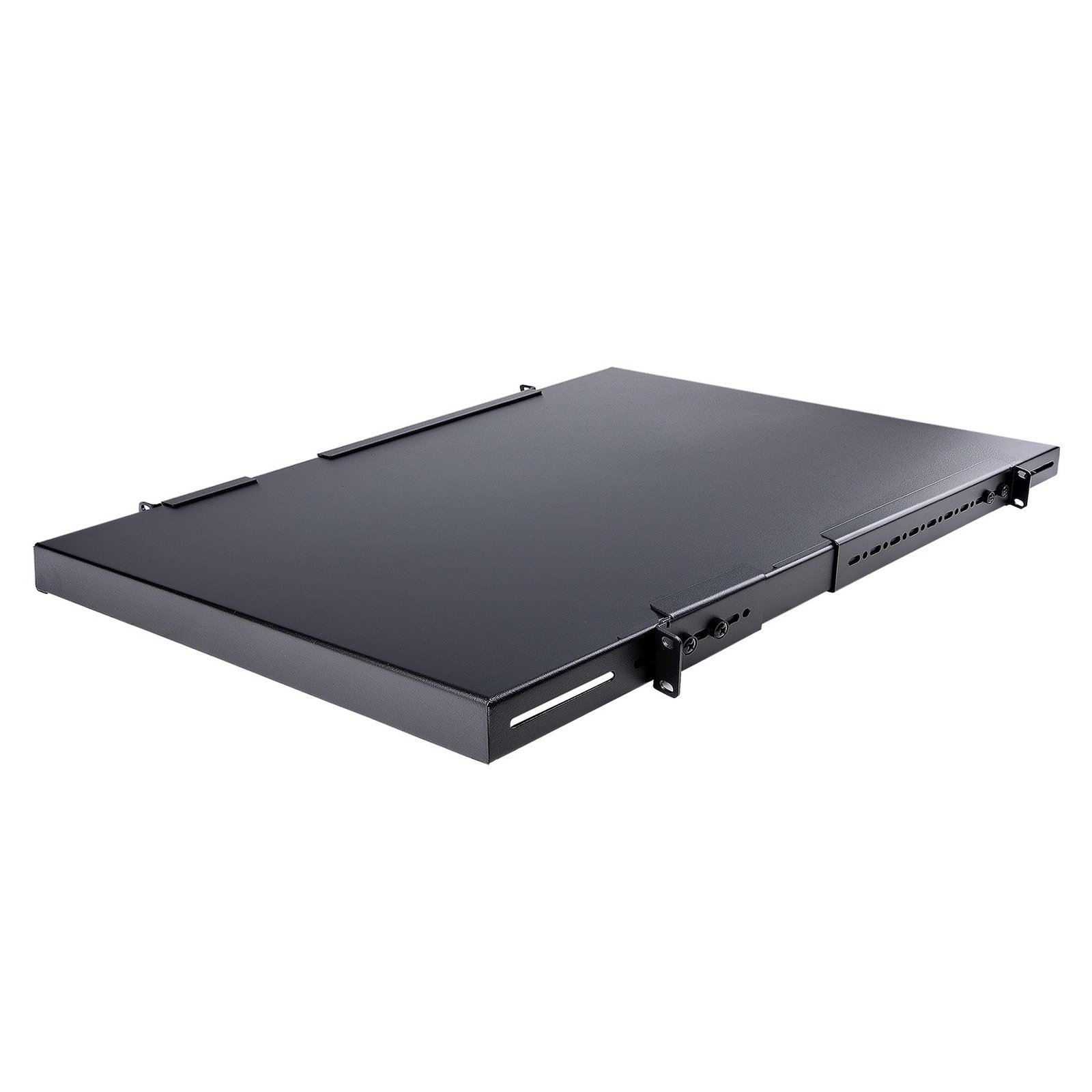
1U 4-Post Adjustable Server Rack Mount Shelf - 330lbs(150 kg) - 19.5 to 38in Adjustable Mounting Depth Universal Tray for 19" AV, Data & Network Equipment Rack - 27.5in Deep
$102.49
Add a high capacity, adjustable depth fixed shelf into almost any 4-Post server rack or cabinet
Specifications & Compliance
- UPC
- 065030897792
- Brand
- StarTech.com
- Included in Package
- 1 - 1U High Cap Adjustable Rack Shelf, 1 - Instruction Manual, 1 - 1U Shelf Body, 2 - Front Mounting Brackets, 2 - Rear Mounting Brackets, 8 - M6x12 mm Screws, 8 - M6 Cage Nuts, 8 - M6 Plastic Washer, 8 - M6x12mm Mounting Bracket Screws
- Shipping (Package) Weight
- 15.9 lb [7.2 kg]
- Weight of Product
- 13.7 lb [6.2 kg]
- Product Length
- 27.6 in [70.0 cm]
- Product Width
- 19.0 in [48.3 cm]
- Product Height
- 1.7 in [44.0 mm]
- Package Depth
- 30.5 in [77.5 cm]
- Package Width
- 20.9 in [53 cm]
- Package Height
- 4.3 in [11 cm]
- Color
- Black
- Warranty
- Lifetime
- Package Quantity
- 1
- Material
- Steel
- Industry Standards
- EIA RS310-D
- Mounting Options
- Front Mount (Front and Rear)
- U Height
- 1U
- Frame Type
- Steel
- Maximum Mounting Depth
- 38.3 in [97.4 cm]
- Cable Management
- No
- Minimum Mounting Depth
- 19.5 in [49.5 cm]
- Weight Capacity (Stationary)
- 330.8 lb [150 kg]
Questions & Answers
How do I safely install equipment in a server rack?
Install the heaviest server rack equipment at the bottom of the rack first to create a stable base and reduce the risk of the rack becoming top-heavy. Use cage nuts and mounting screws to secure compatible rack equipment, and verify that the equipment is securely installed after tightening the screws. Explanation : When installing server rack equipment, start with the heaviest equipment at the bottom of the rack. This approach provides a stable base and helps prevent the rack from becoming top-heavy and falling over, especially when installing multiple devices in a tall rack. For equipment that is long, heavy, unbalanced, or difficult to handle, have another person assist with the installation to help prevent injury or equipment damage. For equipment such as a patch panel that mounts using cage nuts, install the cage nuts in the rack first. Position the equipment, insert the mounting screws into the cage nuts, and tighten the screws without stripping or damaging them. Use extra care with electric tools because they can apply more torque. After installation, confirm that the rack equipment is securely mounted. If you have questions about installing equipment in a server rack, contact the technical support team for assistance.
How do I check if a StarTech.com shelf is compatible with my server rack?
A StarTech.com shelf will fit a server rack if the rack supports 19-inch standard mounting and the shelf depth is within the rack’s supported mounting depth range. Explanation: StarTech.com server racks use the industry-standard 19-inch width, so most shelves designed for 19-inch racks are physically compatible in width. However, compatibility depends primarily on mounting depth and mounting type. Mounting depth compatibility: For shelves that mount on all four posts (4-post racks or cabinet racks), the shelf depth must fall within the rack’s minimum and maximum mounting depth. Both values are listed in the Technical Specifications of the rack and shelf product pages. If the shelf depth exceeds or does not reach the supported range, the shelf cannot be installed. Front-mount shelves: For shelves that mount only on the front posts (2-post mounting), mounting depth is not a constraint. However, there must be sufficient rear clearance in the rack to accommodate the full depth of the shelf and any installed equipment. Accessory validation: If a shelf is listed under the “Accessories” tab on a specific StarTech.com server rack product page, it has been verified as compatible with that rack model.
Related products
-
1U Server Rack Shelf, Universal Rack Mount Cantilever Tray for 19" Network Equipment Rack/Cabinet, Heavy Duty Steel, Weight Capacity 33lb/15kg, 7in (18cm) Deep
$49.19 Add to cart -
1U Server Rack Shelf - Universal Vented Rack Mount Cantilever Tray for 19" Network Equipment Rack & Cabinet - Heavy Duty Steel – Weight Capacity 44lb/20kg - 7" Deep Shelf, Black
$46.11 Add to cart -

2U 19" 2-Post Network Rack Shelf - 20in Deep Center Mount Cantilever Tray Rackmount Shelf for AV/Data Equipment with Cage Nuts & Screws 75lb Weight Capacity
$100.44 Add to cart -
2-Pack 1U Server Rack Shelf, Vented Universal Rack Mount Cantilever Shelf, For 19" Rack/Cabinet, Heavy-Duty Steel, 44lb/20kg Capacity, 16" Deep Tray
$99.41 Add to cart