
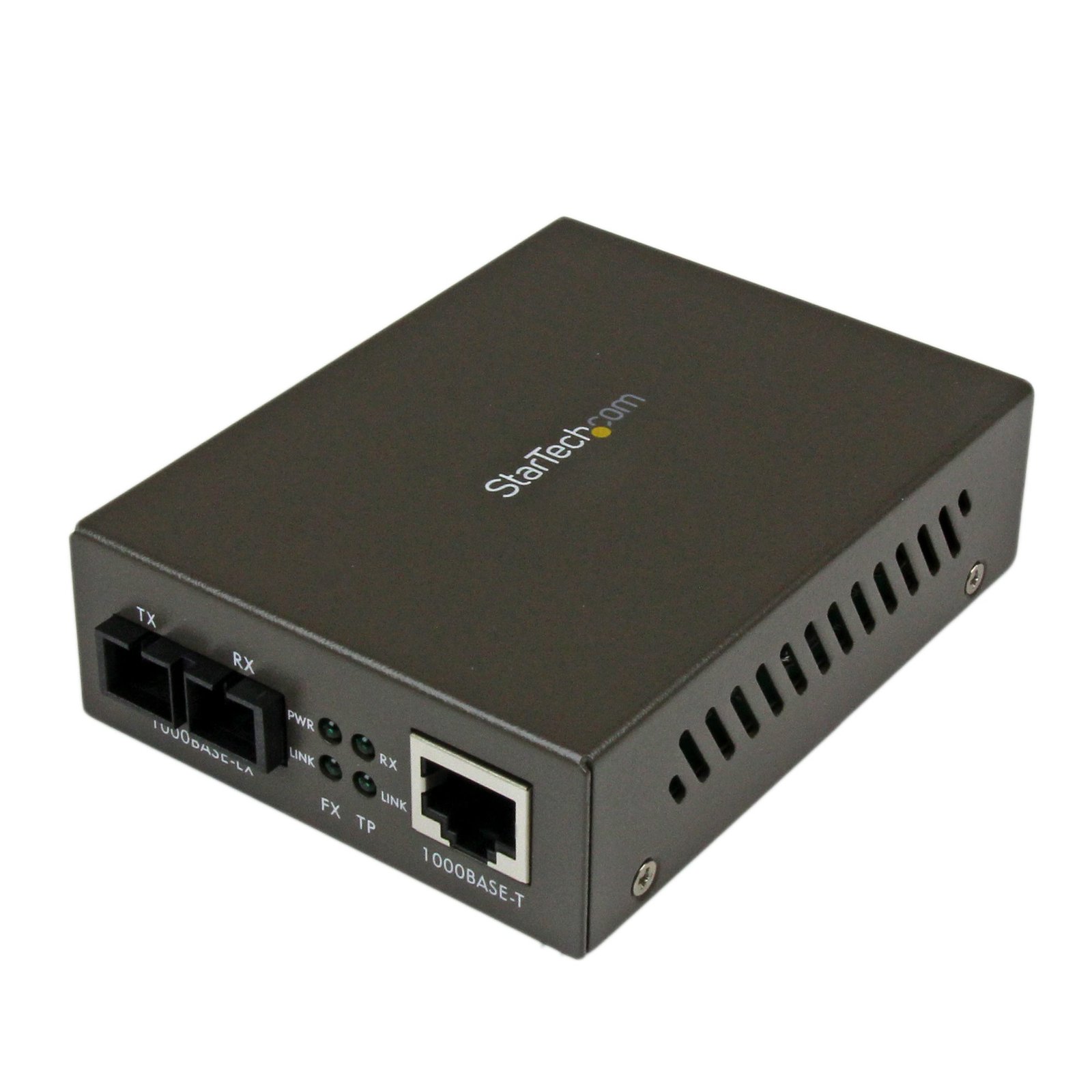
1000 Mbps Gigabit Single-Mode Fiber Ethernet Media Converter SC 15km
$185.99
Convert and extend a Gigabit Ethernet connection up to 15 km over Single Mode SC fiber
Specifications & Compliance
- UPC
- 065030836296
- Brand
- StarTech.com
- Included in Package
- 1 - Media Converter, 1 - Power Adapter, 1 - Instruction Manual
- Shipping (Package) Weight
- 15.1 oz [428 g]
- Weight of Product
- 8.4 oz [238 g]
- Product Length
- 3.9 in [99 mm]
- Product Width
- 2.9 in [73 mm]
- Product Height
- 1.1 in [27 mm]
- Package Depth
- 6.6 in [16.8 cm]
- Package Width
- 8.1 in [20.5 cm]
- Package Height
- 2.6 in [65 mm]
- Color
- Black
- Warranty
- 2 Years
- Connector 1
- SC Duplex Fiber
- Connector 1 (Quantity)
- 1
- Package Quantity
- 1
- Operating Temperature
- 0°C to 40°C (32°F to 104°F)
- Storage Temperature
- -10°C to 70°C (14°F to 158°F)
- Humidity
- 90% RH
- Maximum Data Transfer Rate
- 1000 Mbps (1 Gbps)
- Industry Standards
- IEEE 802.3z 1000BASE-LX/LH
- Power Source
- AC Adapter Included
- Input Voltage
- 110V-240V AC
- Output Voltage
- 9V DC
- Power Consumption
- 5.4
- LED Indicators
- 1 - FX Link: On - Valid Fiber Link, 1 - Power Indicator, 1 - TP Link: On - Valid Ethernet Link, 1 - TP RX: On - Receiving Data on the Ethernet Link
- Input Current
- 0.3 A
- Output Current
- 0.6
- Host Connector 1
- RJ-45
- Host Connector 1 (Quantity)
- 1
- Plug Type
- M
- Fiber Type
- Single Mode
- Center Tip Polarity
- Positive
- Wavelength
- 1310nm
- Max Transfer Distance
- 15 km (9.3 mi)
- Fiber Operating Mode
- Half/Full-Duplex
- Wave Division Multiplexing (WDM)
- No
- PoE
- No
Questions & Answers
Everything is hooked up but nothing is working. What should I do?
When you troubleshoot issues with a fiber media converter, there are some quick tests that you can complete to rule out potential problems. To identify what the source of the issue is, observe the power LED, LAN LEDs, and fiber link LED on the units. If the power LED is not illuminated for the transmitter or the receiver, complete the following: Make sure that you are using the provided power adapter(s). Make sure that the adapter is plugged into a compatible wall outlet. Make sure that the adapter is plugged into both the transmitter and receiver. If another LED is not operating as expected, make sure that the components in your setup are working correctly. To test your setup components, try the following: Use the cables, fiber media converter, and network devices (including SFPs, if applicable) in another setup to see if the problem is with the components or the setup. Use different cables, fiber media converter, and network devices (including SFPs, if applicable) in your setup to see if the problem persists. Ideally, you should test components that you know work in another setup. When you test your cables, it is recommended that you do the following: Test each cable individually. Use short cables when you are testing. Make sure that the DIP switches are set to the following: DIP switches should be identical on both local and remote units. By default, DIP switches are set to Off (the switch is pointing up). For more information about the advanced configuration options, refer to the manual for your product. If you cannot establish a network connection between your local and remote units, you need to do the following to make sure that the issue is not related to the network configuration: Use two computer systems directly connected to the fiber media converter LAN ports. Open a command prompt on Computer 1 and ping Computer 2 . If the issue is not related to the network configuration, you should receive a response from Computer 2. For more information on how to ping another network device, refer to the following FAQ: https://www.startech.com/en-us/support/faqs/technical?topic=networking#ping-test-windows-mac-os .
How do I choose a compatible fiber cable for this fiber media converter?
The fiber cable must match the media converter’s mode, wavelength, connector type, and transmission requirements. Explanation: Fiber cable compatibility with this fiber media converter depends on matching key specifications: Mode compatibility: The cable must match the supported fiber mode (single-mode or multi-mode). Wavelength compatibility: The cable must support the same operating wavelength as the media converter (for example, 850 nm, 1310 nm, or 1550 nm). Wavelength cannot be changed by the cable. Connector compatibility: The cable connectors (such as LC, SC, ST, or MT) must match the media converter ports. Simplex vs. duplex: Both simplex (separate transmit and receive connectors) and duplex (paired transmit and receive connectors) cables are supported, provided they match the port configuration. Cable classification and performance: Fiber type (for example, OM1–OM5 for multi-mode) must meet the required distance and bandwidth, even though basic compatibility depends on matching the mode. When using fiber media converters to extend a copper Ethernet network, both ends of the fiber link must use the same fiber mode, wavelength, and standard to ensure proper communication.
What is the difference between UPC and APC fiber connectors, and which type do StarTech.com fiber products use?
UPC and APC connectors differ in their end-face polish, and StarTech.com fiber products use UPC connectors. Explanation: UPC (Ultra Physical Contact) and APC (Angled Physical Contact) are fiber connector types that differ in how the fiber end face is polished: UPC connectors: The fiber end face is polished flat with a slight dome shape to ensure direct core contact and low insertion loss. APC connectors: The fiber end face is polished at an 8-degree angle to reduce back reflection in high-performance applications. UPC and APC connectors are not compatible and should not be mated. The angled surface of an APC connector prevents proper alignment with a UPC connector, which can result in high signal loss or a failed connection. StarTech.com fiber products use UPC connectors, so they must be connected to other UPC-compatible fiber interfaces to ensure proper operation.
What DC barrel connector power plug types do StarTech.com products use, and what are their dimensions?
StarTech.com DC barrel connector plug types are defined in the “Plug Type” field of the technical specifications, using a letter code that specifies the connector’s outer diameter (OD) and inner diameter (ID) in millimeters for power adapter compatibility. Explanation: In StarTech.com technical specifications, the “Plug Type” field is a standardized identifier for the exact DC barrel connector size required to power a product. Each plug type is assigned a letter code that corresponds to a specific combination of outer diameter (OD) and inner diameter (ID), measured in millimeters. Common DC barrel plug type dimensions Plug Type OD ID A 2.35 mm 0.7 mm B 4.0 mm 1.7 mm C 4.75 mm 1.7 mm H 3.4 mm 1.3 mm L 5.0 mm 2.5 mm M 5.5 mm 2.1 mm N 5.5 mm 2.5 mm The DC barrel connector plug type must match both the outer diameter and inner diameter exactly. A mismatch between the StarTech.com product requirement and the power adapter connector can prevent proper fit or stable power delivery, which may result in device startup failure or intermittent operation. The plug type defines only the physical connector size. The plug type does not define electrical power requirements such as voltage, current, or polarity. The power adapter used with a StarTech.com product must match the product’s specified electrical requirements. Using an incompatible power adapter can cause device malfunction or permanent damage. This standardized DC barrel connector plug type system enables IT professionals and procurement teams to verify connector dimensions, ensure power adapter compatibility, standardize hardware deployments, and identify the correct replacement power supply for StarTech.com products.
Related products
-

Gigabit Ethernet Fiber Media Converter Card Module with Open SFP Slot - TAA
$71.99 Add to cart -
10 Gigabit Ethernet Copper-to-Fiber Media Converter - Open SFP+ - Managed - TAA
$1,153.11 Add to cart -

10/100 Mbps Ethernet Single Mode WDM Fiber Media Converter Kit SC 20km - TAA
$126.99 Add to cart -
1000 Mbps Gigabit Single Mode Fiber Media Converter LC 40 km
$94.99 Add to cart