
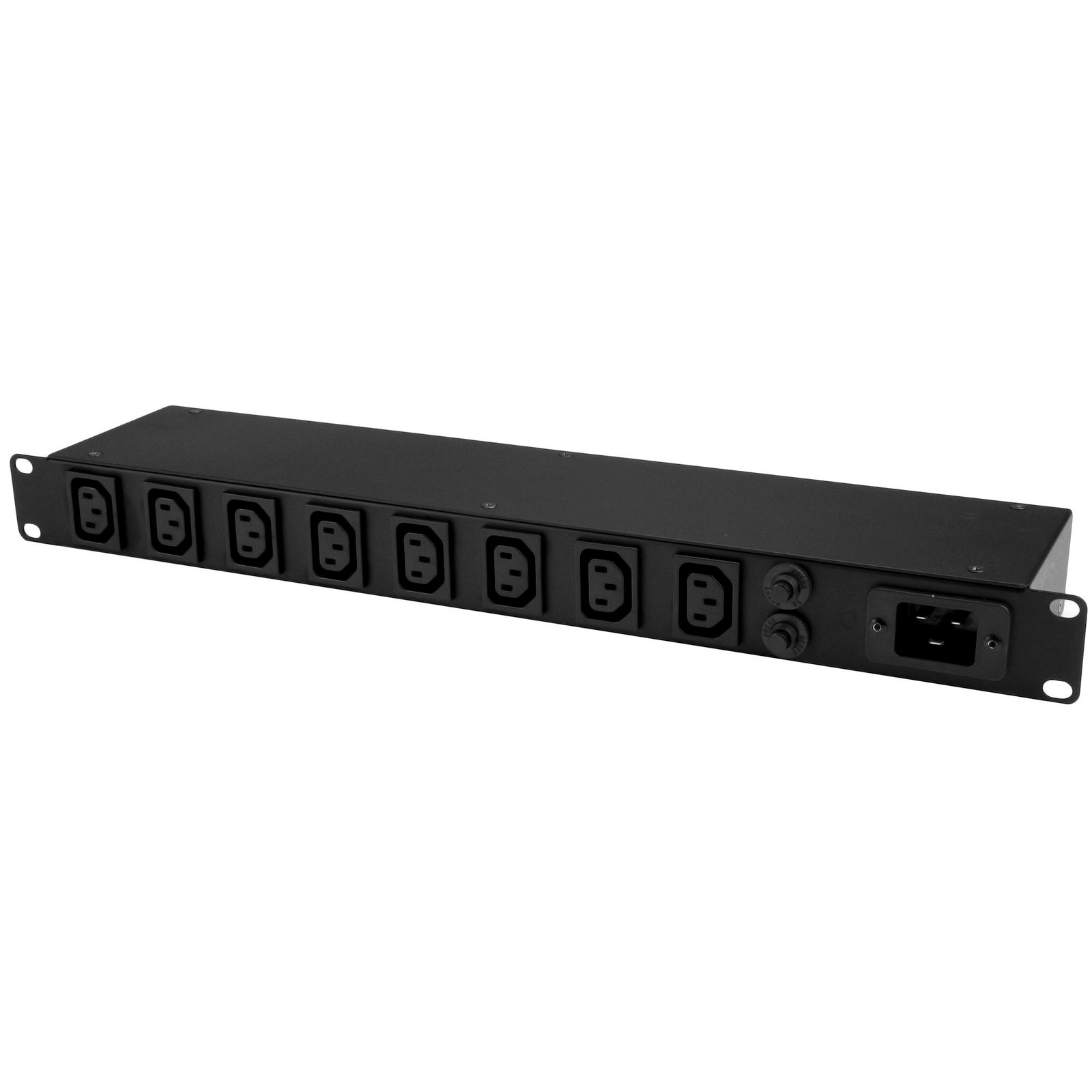
1U 19 inch 8 Port Rack Mount PDU - IEC C13 Socket Rackmount Power Supply/Strip - Horizontal Server Rack Mountable PDU /Data Center Power Distribution Unit 16A 240V
$103.51
Add eight C13 power outlets to your server-rack, with this power distribution unit
Specifications & Compliance
- UPC
- 065030865739
- Brand
- StarTech.com
- Included in Package
- 1 - rack-mount PDU, 1 - 10 ft [3 m] C19 to NEMA5-20p power cord, 4 - M5 screws, 4 - M5 cage nuts, 1 - instruction manual
- Shipping (Package) Weight
- 5.6 lb [2.6 kg]
- Weight of Product
- 3.4 lb [1.5 kg]
- Product Length
- 19.1 in [48.4 cm]
- Product Width
- 3.9 in [98.8 mm]
- Product Height
- 1.7 in [44.0 mm]
- Package Depth
- 21.8 in [55.3 cm]
- Package Width
- 8.0 in [20.4 cm]
- Package Height
- 3.3 in [83 mm]
- Color
- Black
- Warranty
- 2 Years
- Connector 1
- IEC C20 (250V AC, 16A)
- Connector 1 (Quantity)
- 1
- Package Quantity
- 1
- Connector 2
- IEC C13 Receptacle (250V AC, 10A)
- Connector 2 (Quantity)
- 8
- Operating Temperature
- -5°C to 45°C (23°F to 113°F)
- Storage Temperature
- -25°C to 65°C (-13°F to 149°F)
- Humidity
- 0% RH
- Material
- Steel
- Special Notes
- To support 240V a different C19 power cable will need to be sourced to support the higher voltage.
- Input Voltage
- 110V-240V AC
- Output Voltage
- 20V DC
- General Specifications
- Surge Protection: 3600 Joules, Phase Power: Single phase power adapter, Power Cord Included: 10 ft [3 m] C19 to NEMA5-20p
- Rack-Mountable
- Yes
- Form Factor
- Horizontal
- Number of Power Outlets
- 8
- Maximum Output Voltage
- 240V
- Maximum Total Current
- 20A
- Nominal Input Voltage
- 110V - 240V
- Maximum Total Current Draw per Phase
- 20A
- Regulatory Derated Input Current (North America)
- 16A
Questions & Answers
How do I safely install equipment in a server rack?
Install the heaviest server rack equipment at the bottom of the rack first to create a stable base and reduce the risk of the rack becoming top-heavy. Use cage nuts and mounting screws to secure compatible rack equipment, and verify that the equipment is securely installed after tightening the screws. Explanation : When installing server rack equipment, start with the heaviest equipment at the bottom of the rack. This approach provides a stable base and helps prevent the rack from becoming top-heavy and falling over, especially when installing multiple devices in a tall rack. For equipment that is long, heavy, unbalanced, or difficult to handle, have another person assist with the installation to help prevent injury or equipment damage. For equipment such as a patch panel that mounts using cage nuts, install the cage nuts in the rack first. Position the equipment, insert the mounting screws into the cage nuts, and tighten the screws without stripping or damaging them. Use extra care with electric tools because they can apply more torque. After installation, confirm that the rack equipment is securely mounted. If you have questions about installing equipment in a server rack, contact the technical support team for assistance.
What server rack accessories are available, and how do I choose the right ones?
Server rack accessories include shelves, rack rails, DIN rails, casters or leveling feet, cable management solutions, blanking panels, and power distribution units (PDUs). The correct accessories depend on equipment size, weight, mounting requirements, airflow needs, and power distribution requirements. Explanation: Server rack accessories are used to support equipment mounting, improve airflow, organize cabling, and distribute power. Each accessory type serves a specific function and must be selected based on technical compatibility and deployment requirements. Shelves: Server rack shelves are defined by U height (1U = 1.75 inches) and mounting depth. Types include fixed, adjustable, sliding, drawer, cantilever, and heavy-duty shelves. Fixed shelves require equipment to match the shelf depth. Adjustable and sliding shelves support a range of mounting depths. Weight capacity and venting must be verified to ensure proper support and airflow. Rack rails and DIN rails: Rack rails allow mounting of equipment that is not natively rack-mountable and are often depth-adjustable. DIN rails follow an industry-standard mounting format and can be installed in standard 19-inch racks using compatible kits. U size and depth compatibility must be confirmed. Casters and leveling feet: Casters provide mobility, while leveling feet provide stability for stationary installations. Availability and compatibility depend on the specific server rack model and included hardware. Cable management: Cable management accessories include D-ring hooks, cable ducts (conduits), and cable management panels. These components organize and route cables, prevent tangling or strain, and improve airflow. Panels combine multiple management features into a single unit. Blanking panels: Blanking panels (filler panels) cover unused rack units to improve airflow, maintain proper thermal conditions, and restrict physical access to internal components. They are available in vented or solid designs. Power Distribution Units (PDUs): PDUs provide additional power outlets within the rack and are available in multiple U sizes (for example, 1U). Advanced PDUs may support remote power switching over a network. The number of outlets, electrical capacity, and physical size must match the rack and connected equipment. To select the correct server rack accessories, verify U size, depth, weight capacity, mounting compatibility, airflow requirements, and power specifications in the product’s technical documentation.
Related products
-

16-Outlet Horizontal Rack Mount Metered PDU, 1U Server Power Strip w/Surge Protector, 125V/15A, 8ft (2.4m) Power Cable, Power Distribution Unit, TAA
$166.04 Add to cart -

12-Outlet Horizontal Rack Mount Metered PDU, 1U Server Power Strip w/Surge Protector, 125V/15A, 8ft (2.4m) Power Cable, Power Distribution Unit, TAA
$148.61 Add to cart -

Rackmount PDU with 8 Outlets and Surge Protection - 1U
$70.71 Add to cart -
8-Outlet Horizontal Rack Mount PDU, 1U Power Strip, Individual Outlet On/Off Switches w/Covers, 15A Circuit Breaker, 8ft/2.4m Cord, NEMA 5-15P/R, TAA
$96.34 Add to cart