

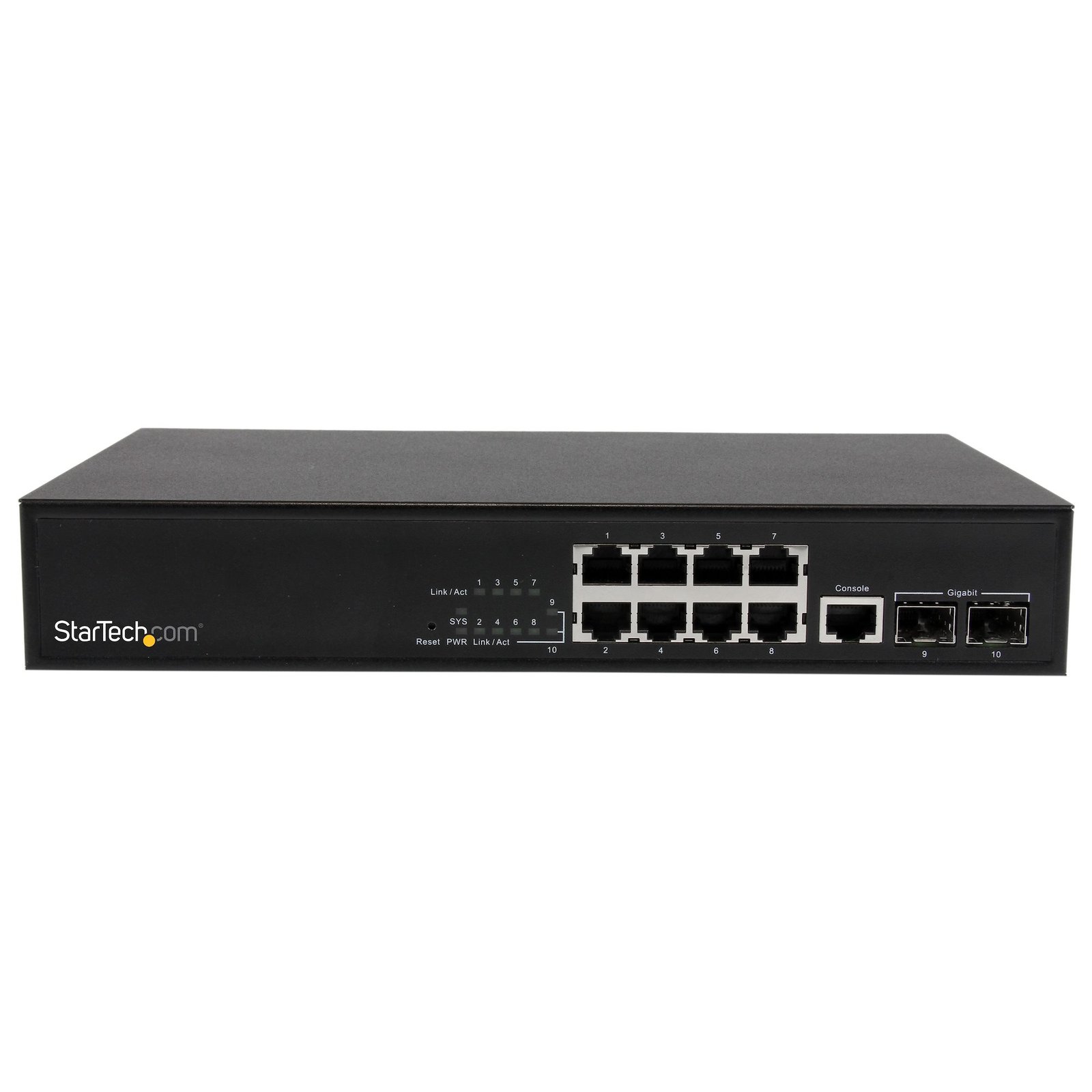
10 Port L2 Managed Gigabit Ethernet Switch with 2 Open SFP Slots - Rack Mountable
$208.99
Scale your network and connect up to 10 different Gigabit Ethernet devices, including 8x RJ45 + 2x fiber optic connections using the SFPs of your choice
Specifications & Compliance
- UPC
- 065030858236
- Brand
- StarTech.com
- Included in Package
- 1 - 10 Port Gigabit Ethernet Switch w/ 2 Open SFP Slots, 2 - Mounting Brackets (1 set), 3 - Power Cords (NA/UK/EU), 1 - Instruction Manual (CD), 1 - Quick Start Guide
- Shipping (Package) Weight
- 4.9 lb [2.2 kg]
- Weight of Product
- 2.4 lb [1.1 kg]
- Product Length
- 10.4 in [26.3 cm]
- Product Width
- 6.3 in [16.0 cm]
- Product Height
- 1.7 in [44.0 mm]
- Package Depth
- 8.2 in [20.9 cm]
- Package Width
- 18.3 in [46.5 cm]
- Package Height
- 2.6 in [67 mm]
- Color
- Black
- Warranty
- 2 Years
- Connector 1
- RJ-45
- Connector 1 (Quantity)
- 8
- Package Quantity
- 1
- Connector 2
- SFP Slot
- Connector 2 (Quantity)
- 2
- Operating Temperature
- 0°C to 40°C (32°F to 104°F)
- Storage Temperature
- -20°C to 90°C (-4°F to 194°F)
- Humidity
- 10~90% RH (Non-Condensing)
- Material
- Steel
- Maximum Data Transfer Rate
- 2000 Mbps (2 Gbps) - Full-Duplex
- Industry Standards
- IEEE 802.3 10BASE-T, IEEE 802.3u 100BASE-TX, IEEE 802.3ab 1000BASE-T, IEEE 802.3z 1000Base-SX/LX, IEEE 802.3az Energy-Efficient Ethernet, IEEE 802.3x Flow Control, IEEE 802.1q VLAN Tagging, IEEE 802.1p QoS, IEEE 802.1x Port-Based Network Access Control, IEEE802.3ad Link Aggregation, IEEE 802.1d Spanning Tree Protocol, IEEE 802.1w Rapid Spanning Tree Protocol
- Power Source
- AC Adapter Included
- Special Notes
- Fiber data transfer speeds and distances are dependent on the SFP used (sold separately)
- Input Voltage
- 90 ~ 260 AC
- Connector 3
- RJ45
- Connector 3 (Quantity)
- 1
- Power Consumption
- 14
- LED Indicators
- 10 - Link / Activity, 1 - Power, 1 - System
- Number of Ports
- 10
- Interface
- RJ45 (Gigabit Ethernet), Fiber Ethernet
- Input Current
- 1.0 A
- Compatible Networks
- 10/100/1000 Mbps
- Auto MDIX
- Yes
- Full Duplex Support
- Yes
- Jumbo Frame Support
- 9.6K max.
- Supported Protocols
- IEEE 802.3ad Port Trunk with LACP, IEEE 802.1D Spanning Tree Protocol, IEEE 802.1w Rapid Spanning Tree Protocol, IEEE 802.1s Multiple Spanning Tree Protocol, IEEE 802.1p Class of Service, RFC 3810 MLD version 2, RFC 792 ICMP, RFC 2068 HTTP, RFC 1112 IGMP version 1, RFC 2236 IGMP version 2, RFC 3376 IGMP version 3, RFC 2710 MLD version 1, IEEE 802.1Q VLAN Tagging, IEEE 802.1x Port Authentication Network Control, bIEEE 802.1ab LLDP, RFC 768 UDP, RFC 793 TFTP, RFC 791 IP
- Flow Control
- Half-duplex back-pressure, IEEE 802.3x full-duplex
- Buffer Size
- 4 MB
- Switching Architecture
- Store-and-Forward
- Auto-Negotiation
- Yes
Questions & Answers
What is this device’s default static IP address?
This device's default static IP address is 192.168.2.1.
How do I reset my device to the default factory settings?
To perform a factory reset, hold down the Reset button for 10 to 15 seconds. This will cause the system to reboot and reset all settings. The System LED will go out briefly and then start flashing once the reset has occurred.
How do I access this device’s web interface?
Make sure that the IES101002SFP is on the same network as your computer. In an Internet browser, enter the IP address of the unit. The default IP address is 192.168.2.1. In the user name field, enter the user name. The default user name is admin .
Related products
-
Industrial 8 Port Gigabit PoE Switch - 30W - Power Over Ethernet Switch - GbE PoE+ Unmanaged Switch - Rugged High Power Gigabit Network Switch IP-30/ -40 C - 75 C - TAA
$560.99 Add to cart -
6 Port Unmanaged Industrial Gigabit Ethernet Switch w/ 4 PoE+ Ports and Voltage Regulation - DIN Rail / Wall-Mountable
$416.99 Add to cart -
8 Port Unmanaged Industrial Gigabit Power over Ethernet Switch - 802.3af/at PoE+ Switch - Wall Mountable - TAA
$185.99 Add to cart -

5-Port Unmanaged Industrial Network Switch, 100/1000 Ethernet, DIN Rail/Wall-Mountable, Rugged IP30 Gigabit Switch, -40F-167F, 9~60V DC, TAA Compliant
$118.99 Add to cart