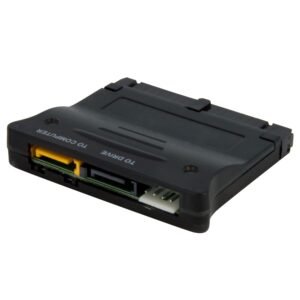
USB to SATA Converter for Raspberry Pi and Development Boards
$16.99
Connect any SATA device to your development board, to increase its data storage capacity and performance
Specifications & Compliance
- UPC
- 065030866798
- Brand
- StarTech.com
- Included in Package
- 1 - USB to SATA converter, 1 - USB-A to Micro-B cable, 2 - standoffs, 2 - nuts, 2 - screws, 1 - quick-start guide
- Shipping (Package) Weight
- 2.5 oz [70.4 g]
- Weight of Product
- 0.3 oz [7.6 g]
- Product Length
- 2.6 in [66.0 mm]
- Product Width
- 0.9 in [23.0 mm]
- Product Height
- 0.4 in [11.0 mm]
- Package Depth
- 5.6 in [14.3 cm]
- Package Width
- 7.0 in [17.8 cm]
- Package Height
- 1.3 in [32 mm]
- Color
- Red
- Warranty
- 2 Years
- Connector 1
- SATA (7-Pin)
- Connector 1 (Quantity)
- 1
- Package Quantity
- 1
- Operating Temperature
- 5°C to 50°C (41°F to 122°F)
- Storage Temperature
- -25°C to 70°C (-13°F to 158°F)
- Humidity
- 15% ~ 90% RH
- Maximum Data Transfer Rate
- 480 Mbps
- Power Source
- USB-Powered
- Chipset ID
- Renesas/NEC - µPD720231A
- MTBF
- 6,481,043 hrs
- Interface
- USB 2.0
- Bus Type
- USB 2.0
- Type and Rate
- USB 2.0 (480Mbps)
- Host Connector 1
- USB Micro-B (480Mbps, 2.5W)
- Host Connector 1 (Quantity)
- 1
- SATA Type and Rate
- SATA III (6 Gbps)
- Compatible Drive Types
- SATA
- Number of Drives
- 1
- RAID
- No
Questions & Answers
Everything is hooked up but nothing is working. What should I do? (Windows)
When you troubleshoot issues with a hard drive controller card, there are some quick tests that you can complete to rule out potential problems. You can test to make sure that the following components are working correctly and are not the source of the issue: IDE, SATA, and eSATA cables Hard drives Hard drive controller card To test your setup components, try the following: Use the IDE, SATA, or eSATA cable, hard drive, and hard drive controller card in another setup to see if the problem is with the components or the setup. Use a different IDE, SATA, or eSATA cable, hard drive, and hard drive controller card in your setup to see if the problem persists. Ideally, you should test a component that you know works in another setup. When you test your cables, it is recommended that you do the following: Test each cable individually. Use short cables when you are testing. When you test the hard drive and hard drive controller card, it is recommended that you do the following: To open the Device Manager, press the Windows key + R , type devmgmt.msc , and press Enter . Check the IDE ATA/ATAPI controllers (for IDE) section, or the Storage controllers (for SATA) section. Do one of the following: If you do not see the hard drive controller card in Device Manager, refer to the following FAQ: https://www.startech.com/en-us/faq/pci-pcie-cannot-boot-os-or-detect-windows . If the device is listed with an error, reinstall the drivers by completing the instructions on the website. If the hard drive is listed with unallocated space, the hard drive needs to be formatted. Right-click unallocated and click New Simple Volume . Follow the on-screen instructions to complete the reformatting. Note: Formatting a hard drive erases all of the data on it. Make sure that you back up all of your data before you reformat the hard drive. To check Disk Management , press the Windows key + R , type diskmgmt.msc , and press Enter . Check to see if your hard drive is listed. If the hard drive is listed as healthy but does not have a drive letter, for example, C:, right-click healthy and click Change Drive Letter and Paths . Click Add , assign a drive letter, and click OK . Note: A formatted hard drive does not show up in Computer or My Computer until it has a drive letter assigned to it.
Is this device compatible with optical drives such as CD-ROM, DVD-ROM, and Blu-ray drives?
Yes, this device is compatible with CD-ROM, DVD-ROM, and Blu-ray drives that use the ATA Packet Interface (ATAPI) protocol. Explanation: This device supports the ATA Packet Interface (ATAPI), which is the required communication protocol for most optical drives, including CD-ROM, DVD-ROM, and Blu-ray drives. Any optical drive that uses ATAPI will function with this device. Optical drives that do not use the ATAPI standard are not supported. Compatibility depends on the optical drive adhering to ATAPI specifications.