
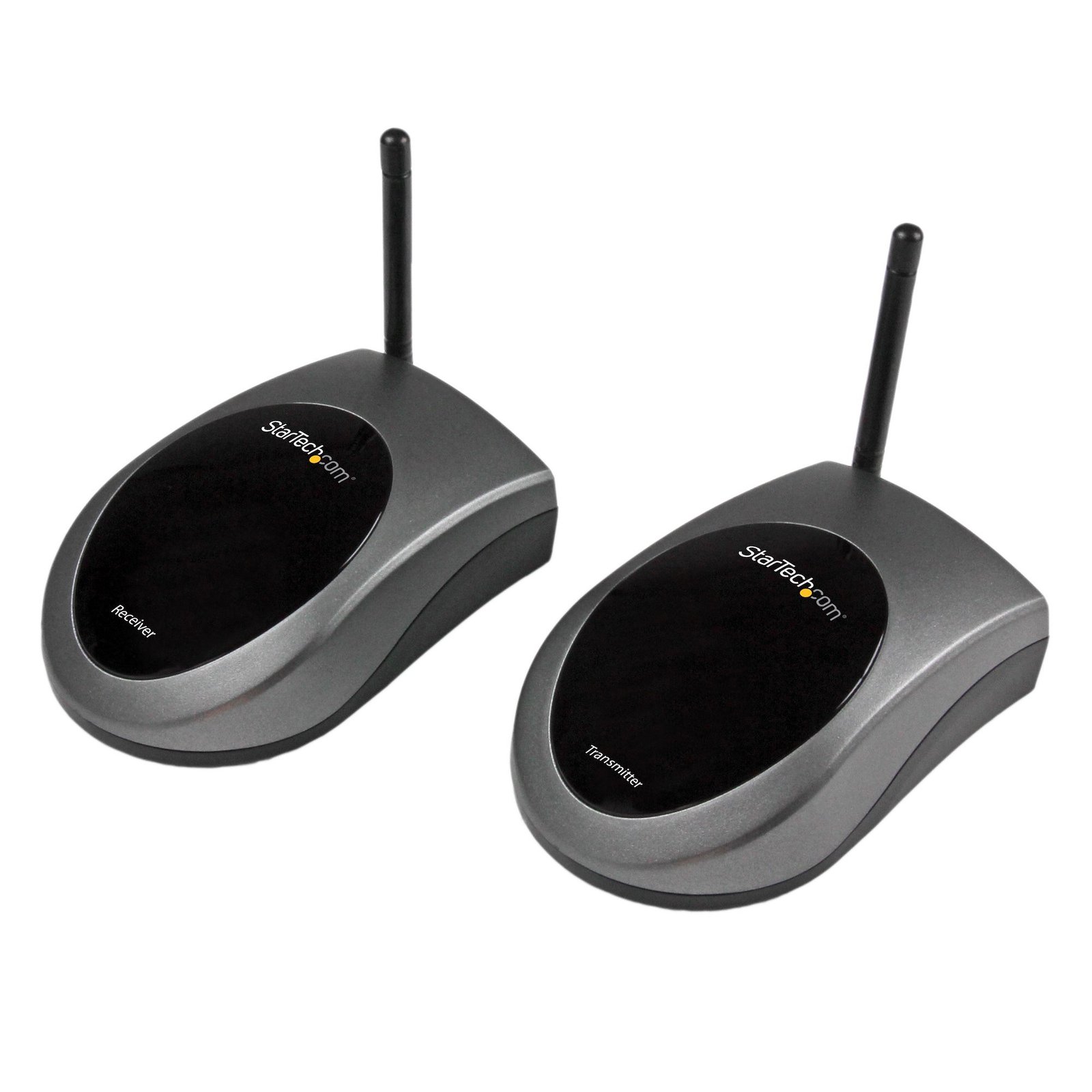


Wireless Infrared IR Remote Control Extender - 330ft (100m)
$87.99
Extend IR remote control signals wirelessly by up to 330 feet (100 meters)
Specifications & Compliance
- UPC
- 065030851275
- Brand
- StarTech.com
- Included in Package
- 1 - IREXT transmitter, 1 - IREXT receiver, 1 - IR extender probe, 2 - Power Adapter, 1 - Instruction Manual
- Shipping (Package) Weight
- 17.3 oz [490 g]
- Weight of Product
- 2.3 oz [65.0 g]
- Product Length
- 3.7 in [95.0 mm]
- Product Width
- 2.6 in [67.0 mm]
- Product Height
- 1.4 in [35.3 mm]
- Package Depth
- 7.3 in [18.6 cm]
- Package Width
- 7.4 in [18.8 cm]
- Package Height
- 2.2 in [57 mm]
- Color
- Black
- Warranty
- 2 Years
- Package Quantity
- 1
- Operating Temperature
- 0°C to 43°C (32°F to 109°F)
- Storage Temperature
- -20°C to 60°C (-4°F to 140°F)
- Power Source
- 2 AC Adapters Included
- Input Voltage
- 100 - 240 AC
- Output Voltage
- 12V DC
- Power Consumption
- 2.4
- Number of Ports
- 1
- Input Current
- 0.3A
- Output Current
- 0.2
- Plug Type
- M
- Max Distance
- 100m [328ft]
- Cabling
- Wireless Ethernet
- Frequency
- 433.92 MHz +/-1 MHz
Questions & Answers
When should I use a longer video cable instead of a video extender?
Use a longer video cable whenever possible; use a video extender only when the required distance exceeds the reliable limits of standard or active cables. Explanation: Direct cabling is the preferred method for video connections because it maintains signal integrity and reduces complexity. Standard maximum cable lengths for common video signals are: Video standard Maximum length DisplayPort 50 ft. (15.2m) HDMI 50 ft. (15.2m) DVI 50 ft. (15.2m) VGA 200 ft. (71m) Active cables can extend these distances by incorporating built-in signal amplification and are designed to exceed standard length limits while maintaining specified performance. Video extenders are used when cable length requirements exceed what passive or active cables can reliably support. Extenders transmit the signal over longer distances by boosting and then restoring it, while maintaining the same video standard from input to output.
What is the correct way to convert and extend a video signal?
Convert the video signal as close to the source as possible, then extend the converted signal using a compatible video extender. Explanation: When both signal conversion and extension are required, the conversion should occur before the signal is extended. Placing the video converter near the source device ensures the signal is converted to the desired format early, which improves compatibility and signal stability over long distances. After conversion, a video extender should be used to transmit the signal over the required distance while maintaining the same video standard end-to-end. For example, to send a VGA signal to a distant HDMI display, first convert VGA to HDMI at the source, then use an HDMI extender to carry the signal to the display. This approach minimizes signal degradation and ensures the extender operates with a consistent signal type throughout the transmission.
What DC barrel connector power plug types do StarTech.com products use, and what are their dimensions?
StarTech.com DC barrel connector plug types are defined in the “Plug Type” field of the technical specifications, using a letter code that specifies the connector’s outer diameter (OD) and inner diameter (ID) in millimeters for power adapter compatibility. Explanation: In StarTech.com technical specifications, the “Plug Type” field is a standardized identifier for the exact DC barrel connector size required to power a product. Each plug type is assigned a letter code that corresponds to a specific combination of outer diameter (OD) and inner diameter (ID), measured in millimeters. Common DC barrel plug type dimensions Plug Type OD ID A 2.35 mm 0.7 mm B 4.0 mm 1.7 mm C 4.75 mm 1.7 mm H 3.4 mm 1.3 mm L 5.0 mm 2.5 mm M 5.5 mm 2.1 mm N 5.5 mm 2.5 mm The DC barrel connector plug type must match both the outer diameter and inner diameter exactly. A mismatch between the StarTech.com product requirement and the power adapter connector can prevent proper fit or stable power delivery, which may result in device startup failure or intermittent operation. The plug type defines only the physical connector size. The plug type does not define electrical power requirements such as voltage, current, or polarity. The power adapter used with a StarTech.com product must match the product’s specified electrical requirements. Using an incompatible power adapter can cause device malfunction or permanent damage. This standardized DC barrel connector plug type system enables IT professionals and procurement teams to verify connector dimensions, ensure power adapter compatibility, standardize hardware deployments, and identify the correct replacement power supply for StarTech.com products.
Related products
-

HDMI over IP Extender with Audio
$251.99 Add to cart -
4K HDMI Extender over CAT6/CAT5 Ethernet Cable, 4K 30Hz or 1080p 60Hz Video Extender, HDMI over Ethernet Cable, HDMI Transmitter and Receiver Kit, IR Remote Control
$162.99 Add to cart -

HDMI Over IP Extender - 1080p
$295.99 Add to cart -
33ft (10m) 8K 60Hz HDMI Signal Booster, Active HDMI 2.1 Inline Repeater and Video Signal Amplifier up to 8K 60Hz/4K 144Hz, Compact HDMI Cable Extender - HDMI Signal Extension - TAA
$130.99 Add to cart