
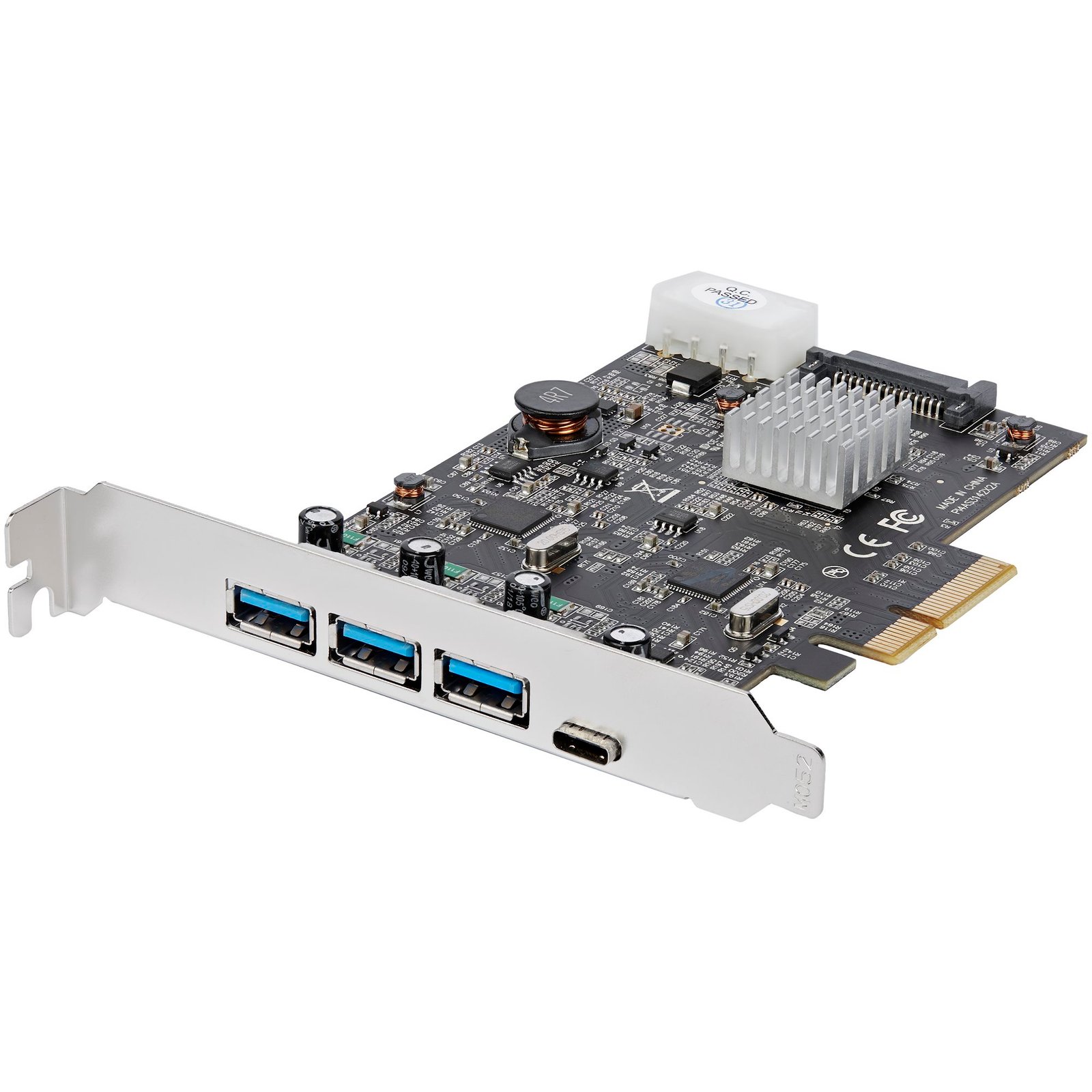
4-Port USB 3.1 PCIe Card - 10Gbps - 3x USB-A and 1x USB-C - 2x Dedicated Channels
$81.99
Add three USB-A ports and one USB-C port, via two host controllers, through a standard PCI Express slot
Specifications & Compliance
- UPC
- 065030878012
- Brand
- StarTech.com
- Included in Package
- 1 - controller card, 1 - instruction manual
- Shipping (Package) Weight
- 4.7 oz [134 g]
- Weight of Product
- 2.9 oz [81.0 g]
- Product Length
- 5.0 in [12.6 cm]
- Product Width
- 3.3 in [85.0 mm]
- Product Height
- 0.8 in [20.0 mm]
- Package Depth
- 5.7 in [14.4 cm]
- Package Width
- 6.7 in [17.1 cm]
- Package Height
- 1.2 in [30 mm]
- Warranty
- 2 Years
- Connector 1
- PCI Express x4
- Connector 1 (Quantity)
- 1
- Package Quantity
- 1
- Connector 2
- USB-A (10Gbps, 4.5W)
- Connector 2 (Quantity)
- 3
- Operating Temperature
- 0°C to 60°C (32°F to 140°F)
- Storage Temperature
- -10°C to 70°C (14°F to 158°F)
- Humidity
- 5% ~ 90% RH
- Maximum Data Transfer Rate
- 10Gbps per 2 ports - 20Gbps Total
- Industry Standards
- USB 3.1 Specification Rev. 1.0 <br /> USB Specification Rev. 2.0<br /> PCI Express Base Specification Rev. 2.0<br /> Intel xHCI Specification Rev. 1.1 <br /> UASP (USB Attached SCSI Protocol) Rev. 1.0
- Chipset ID
- ASMedia - ASM1142</br>Pericom PI7C9X2G308GP
- Special Notes
- The maximum throughput of this card is limited by the bus interface. PCI Express Gen 1.0 max throughput is 2.5Gbps per lane. PCI Express Gen 2.0 max throughput is 5Gbps per lane., The available bandwidth (10Gbps) is shared equally between the two ports.
- Connector 3
- USB-C (10Gbps, 4.5W)
- Connector 3 (Quantity)
- 1
- Number of Ports
- 4
- Interface
- USB 3.2 Gen 2
- Bus Type
- PCI Express
- Type and Rate
- USB 10Gbps
- System and Cable Requirements
- PCI Express enabled computer or server with a PCI Express x4 slot or higher (x8, x16), Optional SATA power or LP4 Molex connector
- Connector 4
- LP4 / Molex Power (4-Pin, 5V / 12V)
- Connector 4 (Quantity)
- 1
- Card Type
- Standard Profile
- UASP Support
- Yes
- Connector 5
- SATA (15-Pin)
- Connector 5 (Quantity)
- 1
- Port Style
- Integrated on Card
Questions & Answers
Do I need to connect an additional power cable from my power supply to a StarTech.com USB expansion card?
It depends; a StarTech.com USB expansion card can be powered by the PCI or PCIe slot, but an additional power cable (such as SATA or Molex) is required if connected USB devices exceed the available slot power. Explanation: A StarTech.com USB expansion card draws power from the motherboard through the PCI or PCI Express slot, which is sufficient for many standard USB devices. However, total available power is limited by the slot. Slot-powered operation: Low-power devices such as USB keyboards, mice, and flash drives typically work without additional power. Auxiliary power requirement: High-power devices, such as external hard drives without their own power supply, may exceed slot power limits and require a direct connection to the system power supply (for example, SATA or Molex). Power-related failure symptoms: Insufficient power may cause devices to disconnect, fail to initialize, or not function simultaneously. Troubleshooting requirement: If any of these issues occur, connecting an auxiliary power cable to the USB expansion card is required for stable operation. A StarTech.com USB expansion card will not reliably power high-demand USB devices without sufficient total power from either the PCI/PCIe slot or an additional power connection.
What is required to transfer data at USB 10Gbps speeds?
To achieve USB 10Gbps data transfer speeds, all components in the connection must support USB 10Gbps performance, including the host port, USB cable, connected device, and any internal subcomponents. Explanation: USB 10Gbps performance requires end-to-end support across the entire connection path, including: The USB host port on the computer or docking station The USB cable The connected USB device Any internal components that affect data throughput, such as storage drives inside a hard drive docking station USB 10Gbps is the current USB-IF naming convention for the specification previously called USB 3.1 Gen 2 and USB 3.2 Gen 2x1. If any component in the connection only supports lower USB performance levels, the entire connection will operate at the maximum speed supported by the slowest component. To confirm compatibility, check the technical specifications for the USB host port, cable, and connected device. Some devices may display USB SuperSpeed 10Gbps branding or equivalent USB 10Gbps markings.
Related products
-
2-Port 10Gbps USB-A & USB-C PCIe Card - USB 3.2 Gen 2 PCI Express Type C/A Host Controller Card Adapter - USB 3.2 Gen 2 PCIe Expansion Add-On Card - Windows, macOS, Linux - TAA
$61.49 Add to cart -
2 Port PCI SuperSpeed (5Gbps) USB 3.0 Adapter Card with SATA Power - TAA
$32.99 Add to cart -

2 Port SuperSpeed (5Gbps) Mini PCI Express USB 3.0 Adapter Card w/ Bracket Kit and UASP Support
$66.99 Add to cart -

2-Port USB 3.1 (10Gbps) Card - USB-A, 1x External, 1x Internal - PCIe
$30.99 Add to cart