
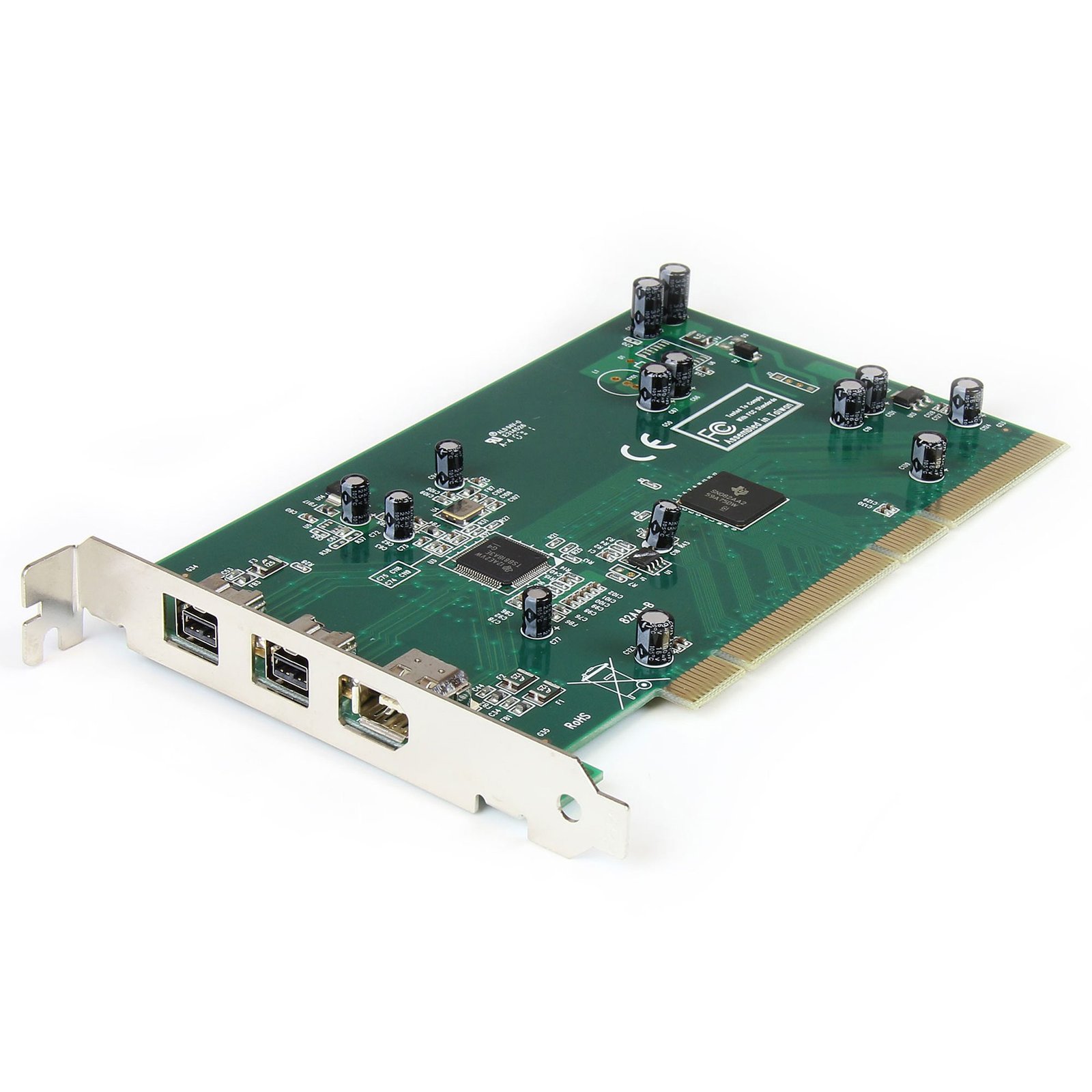


3 Port 2b 1a PCI 1394b FireWire Adapter Card with DV Editing Kit - TAA
$85.99
Add 2 FireWire-800 and 1 FireWire-400 to your desktop computer through a PCI slot
Specifications & Compliance
- UPC
- 065030802116
- Brand
- StarTech.com
- Included in Package
- 1 - PCI FireWire Card, 1 - FireWire Cable, 1 - Software CD, 1 - Instruction Manual
- Shipping (Package) Weight
- 8.5 oz [240 g]
- Weight of Product
- 3.1 oz [89 g]
- Product Length
- 6.6 in [16.7 cm]
- Product Width
- 0.7 in [18 mm]
- Product Height
- 3.9 in [99 mm]
- Package Depth
- 5.7 in [14.6 cm]
- Package Width
- 8.1 in [20.6 cm]
- Package Height
- 1.6 in [40 mm]
- Color
- Green
- Warranty
- Lifetime
- Connector 1
- PCI / PCI-X
- Connector 1 (Quantity)
- 1
- Package Quantity
- 1
- Connector 2
- FireWire 800 (9-Pin, 800Mbps, Bus Power)
- Connector 2 (Quantity)
- 2
- Material
- Steel
- Maximum Data Transfer Rate
- 800 Mbps
- Industry Standards
- PCI 2.2, OHCI, IEEE-1394B, IEEE-1394A, IEEE-1394
- Chipset ID
- Texas Instruments - 3AA651W
- Connector 3
- FireWire 400 (6-Pin, 400Mbps, Bus Power)
- Connector 3 (Quantity)
- 1
- Number of Ports
- 3
- Interface
- FireWire 400 (1394a), FireWire 800 (1394b)
- Bus Type
- PCI / PCI-X (5 / 3.3V)
- System and Cable Requirements
- Unused PCI slot, The PCI1394B_3 must be installed in a 64-bit PCI slot to achieve 800 Mbps data transfer rates. In a 32-bit PCI slot, the card defaults to 400 Mbps as the data transfer speed for all attached peripherals, including FireWire 800 devices
- Card Type
- Standard Profile
Questions & Answers
Does this device require drivers or additional setup?
No. This card is natively supported by all operating systems listed on the product page under the Technical Specifications section. In most cases, the operating system will automatically detect and install the card after it is installed. Explanation: This card uses drivers that are built into the supported operating systems, so no additional driver installation is normally required. To install the card: Install the card in a compatible expansion slot. Start the computer. Allow the operating system to automatically detect and configure the hardware. Once installation is complete, the card should be ready to use without any additional software or configuration. If the card is not functioning correctly in Windows after installation, refer to the FireWire legacy driver FAQ for instructions on switching to the legacy IEEE 1394 driver: https://www.startech.com/faq/firewire-cards-windows-legacy-driver-swap .
Everything is hooked up but nothing is working. What should I do? (Windows)
When you troubleshoot issues with a FireWire controller card, there are some quick tests that you can complete to rule out potential problems. You can test to make sure that the following components are working correctly and are not the source of the issue: FireWire cables FireWire devices FireWire controller card To test your setup components, try the following: Use the FireWire cables, devices, and controller card in another setup to see if the problem is with the components or the setup. Use a different FireWire cable, device, and controller card in your setup to see if the problem persists. Ideally, you should test a component that you know works in another setup. When you test the FireWire device and controller card, it is recommended that you do the following: Press the Windows key + R , type devmgmt.msc , and press Enter to open Device Manager . Check to see if your devices are listed under IEEE 1394 controllers . If you do not see the FireWire controller card listed in Device Manager, refer to the following FAQ: https://www.startech.com/en-us/faq/pci-pcie-cannot-boot-os-or-detect-windows .
How do I install the Firewire 1394 Legacy Driver in Windows 10?
Download the Microsoft Firewire 1394 Legacy Driver Installer Double-click to run the 1394_OHCI_LegacyDriver.msi file. This will extract the drivers to: C:Program Files (x86)1394 OHCI Compliant Host Controller (Legacy) Open the folder: C:Program Files (x86)1394 OHCI Compliant Host Controller (Legacy)X64_driver Right-click on Legacy1394.inf and choose Install to install the drivers Press the Windows Key + R Type devmgmt.msc Click OK In Device Manager , expand IEEE 1394 Bus Host Controllers Right-click on 1394 OHCI Compliant Host Controller Click Update Driver Software Click Browse my computer for driver software Click Let me pick from a list of device drivers on my computer Click 1394 OHCI Compliant Host Controller (Legacy) Click Next (When Windows has finished installing the driver) click Close
How do I confirm that Windows detects my expansion card?
To confirm that Windows detects your expansion card, complete the following: Press the Windows key+ R , type devmgmt.msc , and press Enter . In Device Manager , under the appropriate heading, confirm that your expansion card is listed and that there isn't an exclamation mark next to it. For example, a USB controller card would be under Universal Serial Bus controllers . Your expansion card is listed according to the name of the chipset. To determine the name of the chipset of your expansion card, navigate to www.StarTech.com and look on the Technical Specifications tab for your product.
How do I confirm that my expansion card is detected by the Mac OS?
To confirm that the Mac OS detects your expansion card, complete the following: Click the Apple icon. Click About This Mac . Click More Info or System Report . Under the appropriate heading, confirm that your expansion card is listed and that there isn't an error. For example, a network card would be under Ethernet Cards . Your expansion card is listed according to the name of the chipset. To determine the name of the chipset of your expansion card, navigate to www.StarTech.com and look on the Technical Specifications tab for your product.
Will this PCI card work in a PCI-X slot?
Yes. This PCI card uses a universal PCI connector that is compatible with both 3.3V and 5V PCI and PCI-X slots. Explanation: This PCI card features a universal PCI connector that supports both 3.3V and 5V slot keying. As a result, it can be installed in compatible PCI and PCI-X slots that use either voltage standard. A universal PCI connector is easily identified by the presence of two keying notches on the edge connector. Standard PCI cards designed for only one voltage typically have a single notch. Because this card uses a universal PCI connector, slot voltage keying is not a compatibility concern.
Related products
-
3 Port 2b 1a Low Profile 1394 PCI Express FireWire Card Adapter - TAA
$87.99 Add to cart -

4 Port PCI 1394a FireWire Adapter Card with Digital Video Editing Kit
$32.99 Add to cart -
4 Port PCI Express 1394a FireWire Adapter Card - 3 External 1 Internal
$57.99 Add to cart -
2 Port PCI Express 1394a FireWire Adapter Card
$35.99 Add to cart