
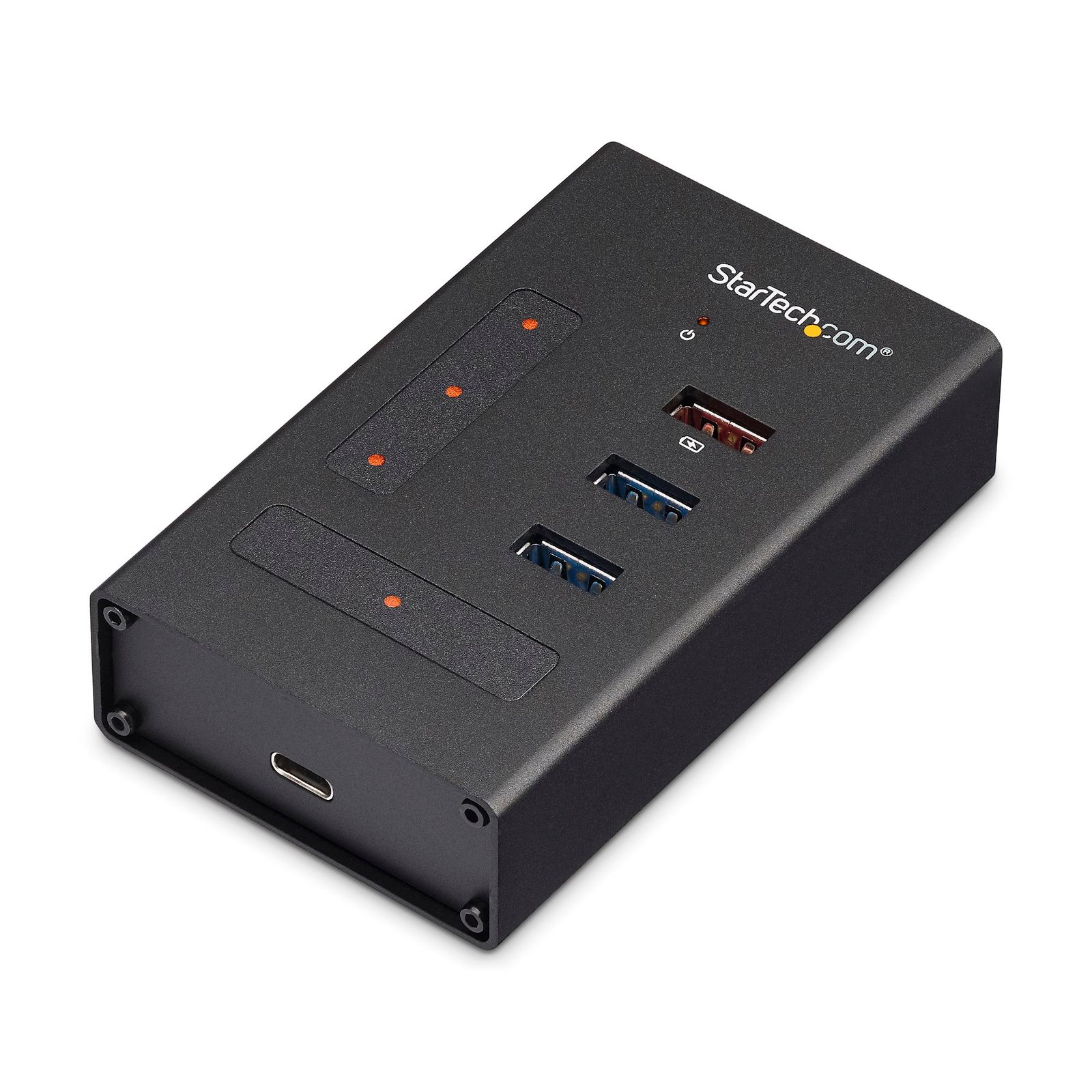
4 Port USB 3.0 Hub - USB Type-A to 1x USB-C & 3x USB-A - Commercial Metal USB Hub - SuperSpeed USB 3.2 Gen 1 (5Gbps)- Self Powered - BC 1.2 Fast Charge - Mountable/Rugged
$70.71
Add three USB Type-A ports and one USB Type-C port to your computer, using this mountable USB 3.2 Gen 1 (5Gbps) hub
Specifications & Compliance
- UPC
- 065030867887
- Brand
- StarTech.com
- Included in Package
- 1 - USB 3.0 hub, 1 - universal power adapter (NA/JP, UK, EU, ANZ), 1 - USB-A to USB-B cable, 2 - rubber feet, 2 - mounting brackets, 4 - mounting screws, 1 - quick-start guide
- Shipping (Package) Weight
- 17.7 oz [502 g]
- Weight of Product
- 4.8 oz [135.0 g]
- Product Length
- 3.9 in [100.0 mm]
- Product Width
- 2.4 in [60.0 mm]
- Product Height
- 0.9 in [24.0 mm]
- Package Depth
- 4.1 in [10.3 cm]
- Package Width
- 6.1 in [15.4 cm]
- Package Height
- 3.9 in [98 mm]
- Color
- Black
- Cable Length
- 3.3 ft [1 m]
- Warranty
- 2 Years
- Connector 1
- USB-B (5Gbps, 4.5W)
- Connector 1 (Quantity)
- 1
- Package Quantity
- 1
- Connector 2
- USB-A (5Gbps, 4.5W)
- Connector 2 (Quantity)
- 2
- Operating Temperature
- 5°C to 35°C (41°F to 95°F)
- Storage Temperature
- -20°C to 50°C (-4°F to 122°F)
- Humidity
- 20~80% RH (Non-condensing)
- Material
- Aluminum
- Maximum Data Transfer Rate
- 5 Gbps (USB 3.2 Gen 1)
- Industry Standards
- USB Battery Charging Specification Rev. 1.2 <br> USB-A charging port delivers up to 2.4 amps of power <br> USB 3.0 - Backward compatible with USB 2.0 and 1.1
- Power Source
- AC Adapter Included
- Chipset ID
- Realtek - RTS5411E
- Special Notes
- The USB Type-C port is data only. <br> USB 3.0 is also known as USB 3.1 Gen 1; this connectivity standard offers speeds up to 5Gbps. <br> The hub does not support DP Alt Mode or USB Power Delivery.
- Input Voltage
- 100 - 240 AC
- Output Voltage
- 12V DC
- Connector 3
- USB-C (5Gbps, 4.5W)
- Connector 3 (Quantity)
- 1
- Power Consumption
- 24
- LED Indicators
- 1 - Power, 4 - Hub Port Connection
- Number of Ports
- 4
- Interface
- USB 3.2 Gen 1 (5Gbps)
- Input Current
- 0.6 A
- Output Current
- 2
- Type and Rate
- USB 5Gbps
- System and Cable Requirements
- Available USB Type-A ports - USB 3.0 (5Gbps)
- Plug Type
- M
- Center Tip Polarity
- Positive
- Connector 4
- USB-A (7.5W Power Only)
- Connector 4 (Quantity)
- 1
- Fast-Charge Port(s)
- Yes
- Form Factor
- Desktop
- USB-C Host Connection
- No
- USB-C Device Port(s)
- Yes
Questions & Answers
Can a USB hub be used without a power adapter, and how does this affect performance?
Yes, a USB hub can be used without a power adapter , but doing so reduces the available power to connected devices and may prevent high‑power devices from functioning properly. Explanation Some USB hubs can operate without an external power adapter by drawing power directly from the host computer’s USB port. In this configuration, the available power is shared across all ports on the hub, which limits the amount of power delivered to each connected device. As a result, high‑power USB devices—such as external hard drives—may not start or may function unreliably when connected to an unpowered hub. When a power adapter is connected, the USB hub can supply more power to each port than a single computer USB port can provide. This improves overall stability and compatibility with power‑intensive devices. Low‑power USB devices, such as keyboards and mice, typically function without issues on an unpowered hub. Additionally, USB devices that use their own external power adapters rely on the hub only for data transfer and do not draw power from the hub. Recommendation For consistent performance and full device compatibility, using the included power adapter is recommended whenever it is available.
What DC barrel connector power plug types do StarTech.com products use, and what are their dimensions?
StarTech.com DC barrel connector plug types are defined in the “Plug Type” field of the technical specifications, using a letter code that specifies the connector’s outer diameter (OD) and inner diameter (ID) in millimeters for power adapter compatibility. Explanation: In StarTech.com technical specifications, the “Plug Type” field is a standardized identifier for the exact DC barrel connector size required to power a product. Each plug type is assigned a letter code that corresponds to a specific combination of outer diameter (OD) and inner diameter (ID), measured in millimeters. Common DC barrel plug type dimensions Plug Type OD ID A 2.35 mm 0.7 mm B 4.0 mm 1.7 mm C 4.75 mm 1.7 mm H 3.4 mm 1.3 mm L 5.0 mm 2.5 mm M 5.5 mm 2.1 mm N 5.5 mm 2.5 mm The DC barrel connector plug type must match both the outer diameter and inner diameter exactly. A mismatch between the StarTech.com product requirement and the power adapter connector can prevent proper fit or stable power delivery, which may result in device startup failure or intermittent operation. The plug type defines only the physical connector size. The plug type does not define electrical power requirements such as voltage, current, or polarity. The power adapter used with a StarTech.com product must match the product’s specified electrical requirements. Using an incompatible power adapter can cause device malfunction or permanent damage. This standardized DC barrel connector plug type system enables IT professionals and procurement teams to verify connector dimensions, ensure power adapter compatibility, standardize hardware deployments, and identify the correct replacement power supply for StarTech.com products.
Related products
-
4-Port Portable USB 2.0 Hub with Built-in Cable
$20.49 Add to cart -
10-Port USB 3.0 Hub with Charge and Sync Ports - 5Gbps - 2 x 1.5A Ports
$96.34 Add to cart -

3-Port USB Hub with Ethernet, USB-A Ports, Gigabit Ethernet/GbE, USB 5Gbps, Rugged Design, Bus-Powered, Portable Laptop USB 3.0 Hub
$57.39 Add to cart -

4-Port USB 2.0 Hub, USB Bus Powered, Small Travel Mini USB Hub, USB 2.0 Splitter, Portable Multi-Port USB Hub, 480Mbps, Overcurrent Protection (OCP)
$12.29 Add to cart